

Adding CSS Text Outline can make your text more visible, stylish, and attention-grabbing. Whether you’re designing a website or a digital project, outlining text can improve readability and aesthetics. In this guide, we’ll explore the best methods to create text outlines using CSS.
Text outline effects are commonly used in headings, banners, hero sections, and graphic-heavy designs where bold typography matters. They help draw the user’s eye, especially against colorful or busy backgrounds. While CSS doesn’t offer a direct text-outline property, developers use clever combinations of text-shadow, -webkit-text-stroke, and layered text to achieve the effect. We’ll cover each of these techniques, show real examples, and highlight compatibility tips so your designs work across all modern browsers. Whether you’re a beginner learning CSS or an experienced developer refining your UI, this guide will give you everything you need to outline text the right way in 2025.
🔥 Key Highlights
🔤 Learn how to add text outlines using CSS techniques.
🎨 Multiple methods including text-shadow, -webkit-text-stroke, and SVG text outline.
📖 Step-by-step examples for easy implementation.
👀 Best practices for improving text visibility and readability.
🌐 Internal and external resources for further learning.
📌 Why Use a CSS Text Outline?
Using a text outline in CSS is beneficial for:
- Enhancing text visibility on complex backgrounds 🎨
- Creating a bold and stylish design ✍️
- Improving readability for users with visual impairments 🧑💻
- Making important headings and call-to-action (CTA) text stand out 🚀
Now, let’s dive into how to add text outline in CSS (best methods & examples)! ⬇️

1️⃣ Method 1: Using text-shadow (Most Compatible ✅)
The most common and widely supported method to create a CSS text outline is using the text-shadow property.
Example:
.outline-text {
    font-size: 48px;
    font-weight: bold;
    color: white;
    text-shadow: -2px -2px 0 black, 2px -2px 0 black, -2px 2px 0 black, 2px 2px 0 black;
}
✅ Advantages:
- Works across all modern browsers 🌍
- Highly customizable using multiple shadows
- Does not require extra properties
❌ Disadvantages:
- Requires multiple
text-shadowvalues for a perfect outline
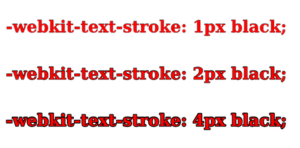
2️⃣ Method 2: Using -webkit-text-stroke (Best for WebKit Browsers 🌐)
Another simple method is using -webkit-text-stroke.
Example:
.outline-text-stroke {
    font-size: 48px;
    font-weight: bold;
    color: white;
    -webkit-text-stroke: 2px black;
}
✅ Advantages:
- Requires only one property 👌
- Creates a clean and even outline
❌ Disadvantages:
- Limited to WebKit browsers (Chrome, Safari, Edge)
- Not supported in Firefox ❌
3️⃣ Method 3: SVG Text Outline (Best for Scalable Design 🖼️)
For advanced designs, SVG text outlines provide high-quality and scalable text effects.
Example:
<svg width="400" height="100">
    <text x="10" y="50" font-size="50" stroke="black" stroke-width="2" fill="white">
        Outlined Text
    </text>
</svg>
✅ Advantages:
- Best for scalable vector-based text 📏
- Great for logos and branding
❌ Disadvantages:
- Requires SVG support
- Slightly complex compared to CSS-only solutions

🎯 Best Practices for Using Text Outlines
-
Use contrasting colors between the text and the outline text css to ensure the text stands out clearly. A dark outline with light text (or vice versa) improves visibility.
-
Avoid overly thick outlines — they can make your text hard to read or visually overwhelming. Aim for balance between emphasis and clarity.
-
Test your designs across multiple browsers like Chrome, Firefox, Safari, and Edge to ensure your CSS text outline renders consistently.
-
Combine multiple CSS techniques like
text-shadow,-webkit-text-stroke, or fallback fonts to ensure broader compatibility and graceful degradation.
🔗 Additional Resources
🎉 Conclusion
Adding a text outline in CSS enhances design aesthetics and readability. The text-shadow method is the most compatible, while -webkit-text-stroke provides a sleek look for WebKit browsers. For scalable designs, SVG text outline css offer the best results.
Try these techniques today and make your text stand out! 🚀 If you found this guide helpful, check out our other CSS tutorials! 😊


