If you have ever opened a website, sent an email, joined a video call, or uploaded a file, you have already used the TCP/IP model without even noticing it.
That may sound technical at first, but don’t worry. This guide is written in a simple, friendly blog style so you can understand the concept easily. At Kaashiv Infotech, we believe networking becomes much easier when it is explained with clarity and real-life examples.
In simple words, the TCP/IP model is a framework that explains how data travels from one device to another across a network, especially the internet. It tells computers how to package, send, route, receive, and understand data correctly.
Let’s break it down step by step.
What Is the TCP/IP Model?
The TCP/IP model, also called the Internet Protocol Suite, is a set of communication rules used to connect devices over a network. It helps computers talk to each other in a reliable and organized way.
The name comes from two major protocols:
- TCP – Transmission Control Protocol
- IP – Internet Protocol
Together, they make internet communication possible.

A simple way to think about it
Imagine sending a parcel to a friend:
- You pack the item properly
- You write the sender and receiver address
- The courier chooses the best route
- The parcel is delivered and unpacked at the destination
The TCP/IP model works in a very similar way, but instead of parcels, it handles digital data.
A Brief History of the TCP/IP Model
The TCP/IP model has roots in the late 1960s and 1970s. It was developed for ARPANET, an early network project funded by the U.S. Department of Defense.
The main goal was simple but powerful: create a communication system that could still work even if parts of the network failed.

Over time, this idea evolved into the protocol suite we now call TCP/IP. In 1983, TCP/IP became the standard protocol for ARPANET, and later it became the backbone of the modern internet.
Today, whether you use a phone, laptop, smart TV, or IoT device, TCP/IP is usually working behind the scenes.
Why Is the TCP/IP Model Important?
The internet would not function properly without the TCP/IP model. It provides a common language for devices made by different companies and running different systems.
Why it matters
- It allows devices to communicate across networks
- It makes data transfer reliable and structured
- It supports routing between local and global networks
- It works across different hardware technologies like Wi-Fi, fiber, and Ethernet
- It is scalable enough for both small offices and the entire internet
In short, the TCP/IP model is the foundation of internet communication.
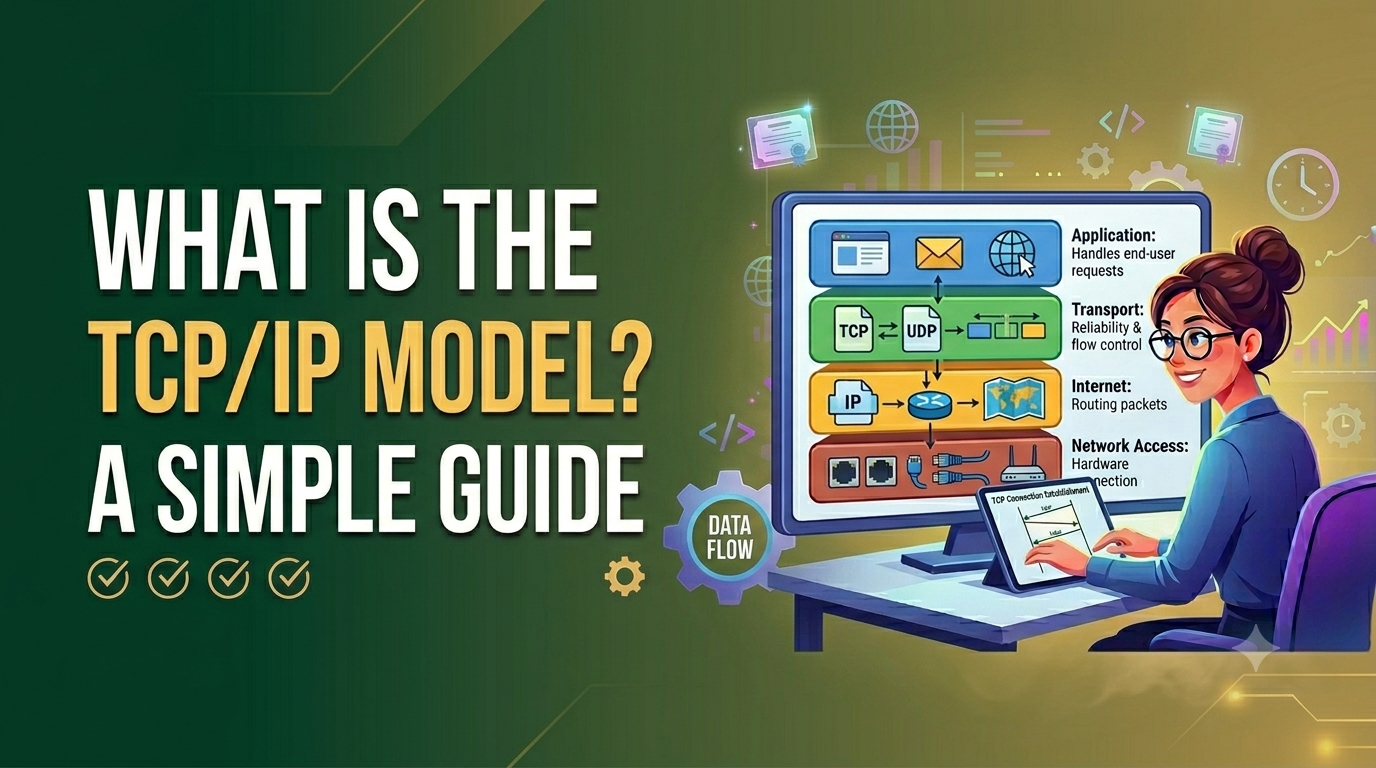
The 4 Layers of the TCP/IP Model
One of the easiest ways to understand the TCP/IP model is to look at its four layers. Each layer performs a specific job.
1. Application Layer
The Application Layer is the top layer. It is the one closest to the user.
This layer provides services that users actually interact with. When you browse a website, send an email, or transfer a file, the application layer is involved.
Common protocols in the Application Layer
- HTTP / HTTPS – used for websites
- FTP – used for file transfer
- SMTP – used for sending emails
- DNS – used to convert domain names into IP addresses
- SSH – used for secure remote access
What this layer does
- Helps applications use the network
- Formats data for transmission
- Makes communication easier for user-facing software
If you type a website address into your browser, the request begins here.
2. Transport Layer
The Transport Layer is responsible for end-to-end communication between devices.
It breaks data into smaller pieces, sends them, and makes sure they arrive properly. This layer also manages flow control, error checking, and sequencing.
Main protocols in the Transport Layer
- TCP
- UDP
TCP vs UDP
TCP is used when reliability matters. It:
- Establishes a connection before sending data
- Ensures data arrives in the right order
- Resends lost packets
- Checks for errors
UDP is used when speed matters more than perfect delivery. It:
- Sends data faster
- Does not establish a formal connection
- Does not guarantee delivery or order
Where they are used
- TCP: web browsing, email, file downloads
- UDP: live streaming, gaming, video calls, DNS queries
So, if TCP is like registered courier service, UDP is like dropping a quick note when speed is more important than confirmation.
3. Internet Layer
The Internet Layer is responsible for addressing and routing data across networks.
This is where the system decides where data should go and how it should get there.

Main protocols in the Internet Layer
- IP (Internet Protocol)
- ICMP
- ARP (often associated with address resolution between layers)
What this layer does
- Assigns logical addresses using IP addresses
- Routes packets between different networks
- Helps devices identify each other
- Reports errors using ICMP
Without this layer, data would not know where to go.
4. Network Access Layer
The Network Access Layer is the lowest layer in the TCP/IP model. It deals with the actual transmission of data over the physical network.
This layer combines responsibilities similar to the Physical Layer and Data Link Layer in the OSI model.
What this layer handles
- Sending data over Ethernet or Wi-Fi
- Working with MAC addresses
- Framing data for local transmission
- Converting digital information into signals
Examples of technologies here
- Ethernet
- Wi-Fi
- Switches
- Network interface cards
This is the layer that physically moves the data from one device to another on a local network.
How Does the TCP/IP Model Work?
Now let’s make this even more practical.
Suppose you open your browser and visit a website.
Step-by-step flow of data
Step 1: Application Layer creates the request
Your browser creates a request using HTTP or HTTPS.
Step 2: Transport Layer breaks the data
The transport layer usually uses TCP to divide the request into smaller segments and make sure delivery is reliable.
Step 3: Internet Layer adds addressing
The internet layer adds the source IP address and destination IP address so the network knows where the data should go.
Step 4: Network Access Layer sends it
The data is converted into frames and sent across the network through Wi-Fi, Ethernet, or another medium.
Step 5: Destination device receives and reassembles it
At the receiving end, the same process happens in reverse. The data is unpacked layer by layer until the website appears in your browser.
This process happens in seconds, often faster than we can notice.

Common Protocols Used in the TCP/IP Model
The TCP/IP model includes many protocols, but some are used more often than others.
Important protocols to know
- TCP – reliable data delivery
- UDP – fast data delivery
- IP – logical addressing and routing
- HTTP/HTTPS – web communication
- FTP – file transfer
- SMTP – email sending
- DNS – domain name resolution
- ICMP – network diagnostics and error reporting
- ARP – mapping IP addresses to MAC addresses
These protocols work together like a team. Each one has a specific role, and together they keep network communication running smoothly.
TCP vs IP: What’s the Difference?
This is one of the most searched networking questions, and the answer is simple.
TCP
TCP makes sure data is delivered:
- Correctly
- In order
- Without missing pieces
IP
IP is responsible for:
- Giving devices addresses
- Routing packets to the destination
Easy analogy
- IP decides where the parcel should go
- TCP makes sure every item in the parcel arrives safely and in the correct order
They work together, but they do different jobs.
TCP/IP Model vs OSI Model
Many students confuse the TCP/IP model with the OSI model. Both explain network communication, but they are not the same.
Main differences
Number of layers
- OSI model: 7 layers
- TCP/IP model: 4 layers
Practical use
- OSI: mostly a reference and teaching model
- TCP/IP: widely used in real-world networking
Layer grouping
In TCP/IP:
- The Application Layer combines the OSI application, presentation, and session layers
- The Network Access Layer combines the OSI data link and physical layers
Why both are still important
- The OSI model helps people understand networking in detail
- The TCP/IP model explains how internet communication actually works in practice
So if you are learning networking, it is useful to know both.
Advantages of the TCP/IP Model
The TCP/IP model became the internet standard for good reasons.
Key advantages
- Scalable: works for small and large networks
- Reliable: especially when using TCP
- Flexible: supports many device types and network technologies
- Interoperable: allows different systems to communicate
- Widely adopted: used across the world
- Protocol-based: each protocol has a clear role
Disadvantages of the TCP/IP Model
No model is perfect, and TCP/IP also has a few limitations.
Common drawbacks
- It can be difficult for beginners to understand at first
- Security is not built equally into every protocol
- Troubleshooting can be complex in large networks
- TCP can add overhead because of acknowledgments and retransmissions
- Layer boundaries are not always as neatly defined as in the OSI model
Still, despite these challenges, it remains the most practical and widely used communication model.
Real-World Uses of the TCP/IP Model
The TCP/IP model is not just theory. It is used in everyday technology all around us.
Where you see TCP/IP in action
- Web browsing – loading websites with HTTP/HTTPS
- Email services – sending and receiving messages
- File transfers – using FTP, SFTP, or cloud syncing
- Video calls – Zoom, Google Meet, Teams
- Online gaming – fast communication using UDP
- VPN connections – secure remote access
- IoT devices – smart cameras, lights, and sensors
- Cloud platforms – servers and services communicating over networks

Basically, if devices are connected and exchanging data, TCP/IP is probably involved.
Become A Networking Professional With Kaashiv Infotech
Looking to dive into the world of network infrastructure and carve your path to success? Kaashiv Infotech is here for you! Our specialized Networking course in chennai & Certification Program is specially designed by industry veterans to equip you with practical, hands-on skills and real-world deployment experience that will help you to set your foot in the competitive Networking industry.
Let’s break down our training offerings to see what makes our program stand out:
- Live Industry Projects + Portfolio Integration: You’ll work on enterprise-level network implementations to build a solid portfolio and enhance your learning with 2 real-time industry projects per internship that showcase your configuration and troubleshooting skills.
- Hands-On Configuration Drills: Get daily practice with router/switch setups, VLAN segmentation, and security policy exercises that enhance your learning and help you master core networking concepts.
- Doubt Clearing Sessions: Our regular doubt-solving sessions ensure that no technical question goes unanswered, giving you absolute clarity on routing protocols, switching architectures, and cloud connectivity.
- Expert-Led Infrastructure Labs: Access our dedicated networking labs for guided practice and polish your technical skills under the direct mentorship of Microsoft MVPs and Google-recognized experts in a supportive environment.
- Industry-Oriented Curriculum: Learn enterprise-ready skills and modern networking techniques that are directly applicable to real-world IT infrastructure, SD-WAN, and cybersecurity scenarios.
- Triple Certification Credential: Earn a highly valued Triple Certificate upon completion (Internship Certificate, IPT Certificate, and Industrial Exposure Certificate) that is recognized and prioritized by top tech employers.
- Peer & Expert Q&A Forum: Engage with fellow batchmates and certified network architects in our Q&A forum to exchange troubleshooting strategies, seek advice, and collaborate on live infrastructure projects.
- Instructor-Led Sessions: Benefit from interactive, step-by-step live sessions led by certified networking professionals who guide you through every lab deployment and architectural concept.
- Targeted Interview Preparation: Gain access to exclusive placement drives, ATS-friendly resume optimization tools, and comprehensive networking interview question banks to help you land your dream job in network engineering.
- 100% Job Assistance Guarantee + Kaashiv Alumni Support: We’re offering dedicated 100% job assistance along with ongoing career mentorship and referral support from our active Kaashiv alumni network.
Conclusion
The TCP/IP model may look complex in the beginning, but the core idea is actually simple: it is a structured system that helps devices communicate over a network.
It does this through four layers:
- Application Layer
- Transport Layer
- Internet Layer
- Network Access Layer
Each layer has a clear job, and together they make internet communication possible. From browsing websites to sending emails and streaming videos, the TCP/IP model is working quietly in the background every day.
If you are starting your networking journey, learning the TCP/IP model is one of the smartest first steps you can take. Once you understand how these layers work, many other networking topics become much easier.
At Kaashiv Infotech, we always recommend building strong basics first, and the TCP/IP model is one of those basics that truly matters.
FAQs
1. What are the 4 layers of the TCP/IP model?
The four layers of the TCP/IP model are Application Layer, Transport Layer, Internet Layer, and Network Access Layer. Each layer handles a different part of communication, from user applications to actual physical data transmission.
2. What is the difference between TCP/IP and the OSI model?
The OSI model has 7 layers and is mainly used as a conceptual reference, while the TCP/IP model has 4 layers and is used in real-world internet communication. TCP/IP is more practical, while OSI is often used for learning and analysis.
3. Why is the TCP/IP model important?
The TCP/IP model is important because it provides the standard method that devices use to communicate over networks. It enables web browsing, email, file sharing, video calls, and almost every major internet service we use today.
4. How does TCP/IP work in simple words?
TCP/IP works by breaking data into smaller packets, adding addressing information, sending those packets across a network, and then reassembling them at the destination. This process happens layer by layer to ensure efficient communication.
5. What is the difference between TCP and IP?
TCP ensures reliable and ordered delivery of data, while IP is responsible for addressing and routing packets to the correct destination. In short, IP handles the path, and TCP handles safe delivery.
If you want, I can also turn this into a WordPress-ready blog format, HTML format, or add schema markup for the FAQ section.