
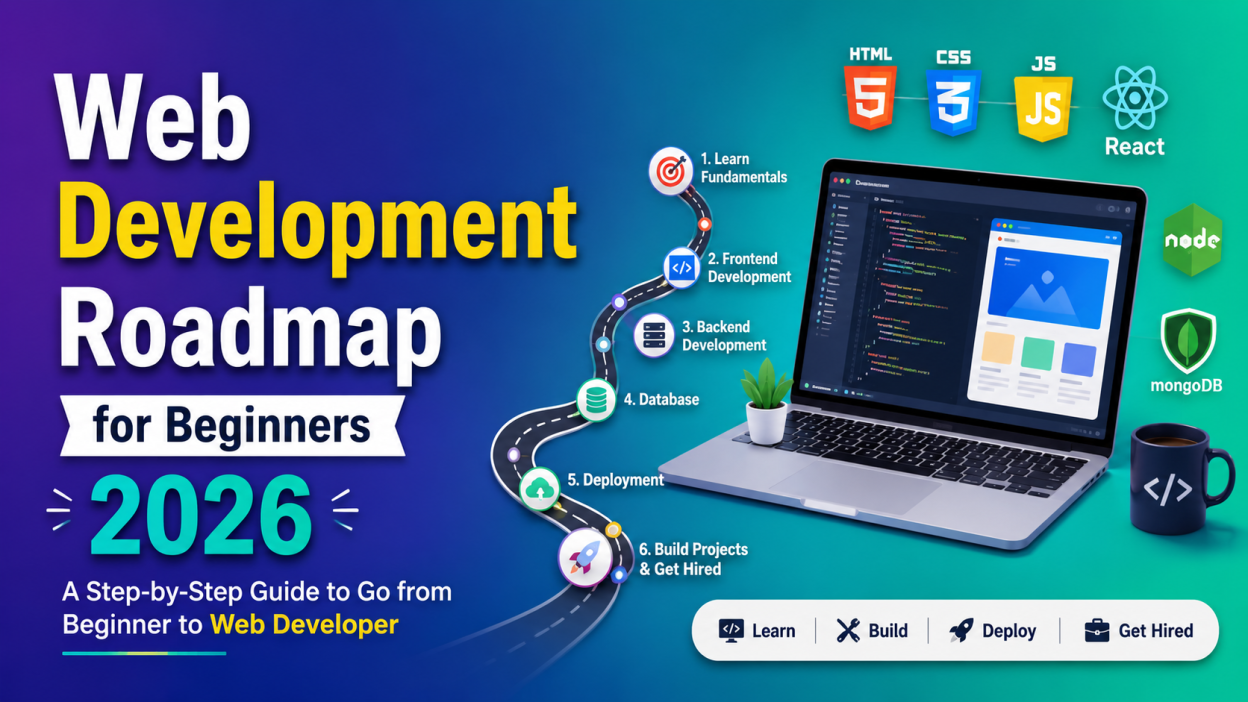
Web Development Roadmap for Beginners 2026 is the guide I wish someone had handed me when I first became interested in websites. Instead of wasting weeks jumping between random YouTube videos, online courses, and blog posts, I could have followed one clear path.
If you’re wondering where to start web development in 2026, which technologies actually matter, or whether you need a Computer Science degree—the short answer is no.
In this guide, I’ll walk you through the exact Web Development Roadmap for Beginners 2026 that I would recommend to any complete beginner. Whether you’re a student, career changer, or someone learning as a hobby, this roadmap can help you move from writing your first HTML page to building full-stack applications.
✨ Key Highlights
- ✅ Learn the Web Development Roadmap for Beginners 2026 step by step.
- ✅ Understand frontend, backend, and full-stack development.
- ✅ Discover the best programming languages to learn first.
- ✅ Learn free resources and websites for practice.
- ✅ Build projects that impress recruiters.
- ✅ Create a portfolio and GitHub profile.
- ✅ Prepare for internships and developer jobs in 2026.
What is Web Development? 🌐
Before I started learning, I thought web development meant simply creating attractive websites. I couldn’t have been more wrong.
Web development is the process of building websites and web applications that people can use through a browser. Every website you visit—from shopping sites to banking apps—was created by web developers.
For example:
- Amazon
- Netflix
- Gmail
- Spotify
These are all web applications built using different web development technologies.
Why Learn Web Development in 2026?
This is probably the most common question I hear.
Is web development still worth learning when AI can generate code?
My answer is absolutely yes.
AI has become an amazing assistant, but it still needs developers who understand:
- Problem-solving
- User experience
- Website architecture
- Security
- Performance optimization
- Business requirements
Companies aren’t hiring people who memorize syntax anymore. They’re hiring developers who know how to build complete solutions.
That’s why following the right Web Development Roadmap for Beginners 2026 matters more than ever.
Step 1: Learn How the Internet Works 🌍
I used to type website addresses without ever wondering what happened behind the scenes.
Once I learned these basics, everything started making sense.
Understand:
- What is a website?
- What is a browser?
- How does HTTP and HTTPS work?
- What is DNS?
- What are servers?
- How do domains work?
Don’t worry—you don’t need to become a networking expert.
Just understand the big picture.
Step 2: Master HTML 📝
HTML is the foundation of every website.
Think of HTML like the skeleton of a human body.
Without it, nothing exists.
Learn topics like:
- Headings
- Paragraphs
- Images
- Links
- Lists
- Tables
- Forms
- Semantic HTML
- Audio and Video
- HTML5 elements
🎯 Mini Project Idea
Create:
- Personal profile page
- Resume website
- Restaurant webpage
Step 3: Learn CSS 🎨
Once I learned CSS, my boring websites finally looked like real websites.
CSS controls:
- Colors
- Fonts
- Layout
- Spacing
- Animations
- Responsive design
Focus on learning:
- Selectors
- Box Model
- Flexbox
- Grid
- Position
- Media Queries
- Transitions
- Animations
💡 Try recreating the homepage of your favorite website. It’s one of the best ways to improve.
Step 4: Learn JavaScript ⚡
If HTML is the structure and CSS is the design, JavaScript is the brain.
It makes websites interactive.
Learn:
- Variables
- Data Types
- Functions
- Arrays
- Objects
- Loops
- Conditions
- DOM Manipulation
- Events
- ES6 Features
- Fetch API
- Async & Await
I remember the excitement of creating my first button that actually changed text when clicked. It felt like magic.
Step 5: Learn Git and GitHub 💻
One mistake I made early on was ignoring Git.
Big mistake.
Every software company uses version control.
Learn:
- Git installation
- Repository
- Commit
- Push
- Pull
- Branch
- Merge
- Clone
Also create your GitHub profile and upload every project.
Recruiters love seeing real work.
Step 6: Build Real Projects 🚀
This is where many beginners get stuck.
They keep watching tutorials without building anything.
I learned much faster when I started creating projects on my own.
Some beginner-friendly ideas:
- Calculator
- Weather App
- To-Do List
- Portfolio Website
- Quiz App
- Movie Search App
- Recipe Finder
- Notes App
- Expense Tracker
Projects teach lessons that videos simply can’t.
Step 7: Learn Responsive Web Design 📱
People don’t browse only on laptops anymore.
Your website should also work on:
- Mobile phones
- Tablets
- Large screens
Learn:
- Mobile-first design
- Responsive layouts
- Media Queries
- Flexible images
- Responsive typography
Always test your website on different screen sizes.
Step 8: Learn a Frontend Framework ⚛️
Once you’re comfortable with JavaScript, it’s time to move forward.
The most popular frontend framework in 2026 is still React.
Other options include:
- React
- Vue.js
- Angular
- Svelte
I recommend starting with React because many companies use it.
Learn:
- Components
- Props
- State
- Hooks
- Routing
- API integration
Step 9: Learn Backend Development 🖥️
Frontend creates what users see.
Backend handles what users don’t see.
Examples include:
- Login
- Database
- Payment processing
- Authentication
- File uploads
Popular backend technologies:
- Node.js
- Express.js
- ASP.NET Core
- Django
- Spring Boot
Choose one and master it.
Step 10: Learn Databases 🗄️
Almost every application stores information somewhere.
You’ll need database knowledge.
Learn:
SQL Databases
- MySQL
- PostgreSQL
- SQL Server
NoSQL Databases
- MongoDB
Practice:
- SELECT
- INSERT
- UPDATE
- DELETE
- JOIN
- GROUP BY
These queries become second nature with practice.
Step 11: Learn Deployment ☁️
A website sitting on your laptop won’t help your career.
Deploy your projects online.
Popular platforms include:
- GitHub Pages
- Vercel
- Netlify
- Render
Having live project links makes your portfolio much stronger.
Step 12: Build Your Portfolio 🎯
This step changed everything for me.
Instead of saying:
“I know HTML and CSS.”
Show people what you’ve built.
Include:
- About Me
- Skills
- Projects
- Resume
- Contact Form
- GitHub Profile
- LinkedIn Profile
A strong portfolio often speaks louder than certificates.
Coding Practice
- Frontend Mentor
- CodePen
- freeCodeCamp
- LeetCode
- HackerRank
Common Mistakes Beginners Make ❌
I’ve seen many learners—including myself—fall into these traps:
- Watching tutorials without practicing
- Trying to learn every framework at once
- Skipping HTML fundamentals
- Ignoring Git and GitHub
- Never building personal projects
- Comparing yourself with experienced developers
- Giving up too early
Progress isn’t always obvious day to day, but consistency pays off.
Suggested Learning Timeline 📅
Here’s a realistic timeline if you’re studying regularly:
| Month | Topics |
|---|---|
| Month 1 | HTML + CSS |
| Month 2 | JavaScript Basics |
| Month 3 | Advanced JavaScript + Git |
| Month 4 | React |
| Month 5 | Backend + Database |
| Month 6 | Projects + Portfolio + Deployment |
Remember, everyone learns at a different pace. It’s perfectly fine if it takes a little longer.
Career Opportunities After Following the Web Development Roadmap for Beginners 2026 💼
Once you’ve completed this roadmap and built a solid portfolio, you can apply for roles such as:
- Frontend Developer
- Backend Developer
- Full-Stack Developer
- UI Developer
- Web Designer
- Software Engineer
- React Developer
- ASP.NET Developer
- Freelance Web Developer
The demand for skilled web developers continues across startups, product companies, and service-based organizations.
Final Thoughts ❤️
When I first started learning web development, I felt overwhelmed. Every article suggested a different path, and every video introduced another “must-learn” technology. Looking back, I realize I didn’t need to learn everything—I just needed a roadmap.
That’s exactly what this Web Development Roadmap for Beginners 2026 is meant to provide: a clear, practical path from beginner to job-ready developer.
My advice is simple: start today, build consistently, and don’t be afraid to make mistakes. Every bug you fix and every project you complete will teach you something valuable. Six months from now, you’ll be amazed at how much you’ve grown.
Happy coding! 🚀
Kaashiv Infotech Offers,Web Development Course, Full Stack Python Course, Data Science Course, & More, visit their website www.kaashivinfotech.com.


