

Key Highlights ✅
- Understand SQL queries and their role in managing databases.
- Learn the 15 most common SQL queries with real-world examples.
- Improve your SQL skills for efficient data handling and optimization.
- Essential for developers and data professionals working with large datasets.
Introduction: Why SQL Queries Matter
SQL (Structured Query Language) is the backbone of database management, enabling efficient data retrieval, updating, and deletion. Whether you’re a developer, data analyst, or database administrator, mastering SQL queries is crucial for working with relational databases effectively.
This guide covers the 15 most common SQL queries, along with practical examples to help you perform essential database operations with ease. Let’s dive in! 🚀
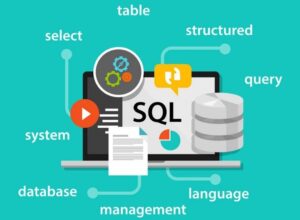
What is SQL?
SQL is a powerful language used to manage and manipulate relational databases. It provides commands for retrieving, updating, inserting, and deleting data in Relational Database Management Systems (RDBMS).
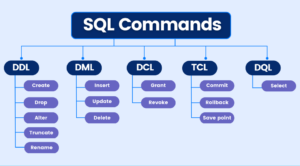
Key SQL Components:
- Data Definition Language (DDL): Defines and manages database structure.
- CREATE – Creates a table.
- ALTER – Modifies a table.
- DROP – Deletes a table.
- Data Manipulation Language (DML): Manages database records.
- SELECT – Retrieves data.
- INSERT – Adds new data.
- UPDATE – Modifies existing data.
- DELETE – Removes data.
- Data Query Language (DQL): Focuses on retrieving data.
- SELECT – Queries the database for information.
- Data Control Language (DCL): Manages access control.
- GRANT – Provides permissions.
- REVOKE – Removes permissions.
- Transaction Control Language (TCL): Handles database transactions.
- COMMIT – Saves changes.
- ROLLBACK – Undoes changes.
15 Most Common SQL Queries 🔥
Now, let’s explore the 15 most used SQL queries with syntax and real-world examples.
1. SELECT Statement (Retrieve Data)
SELECT * FROM employees;
SELECT first_name, last_name FROM employees;
2. SELECT DISTINCT (Remove Duplicates)
SELECT DISTINCT department FROM employees;3. WHERE Clause (Filter Data)
SELECT * FROM employees WHERE age > 30;
4. ORDER BY Clause (Sort Data)
SELECT * FROM employees ORDER BY age DESC;
5. LIMIT and OFFSET (Paginate Data)
SELECT * FROM employees LIMIT 5 OFFSET 10;
6. INSERT Statement (Add Data)
INSERT INTO employees (id, name, age) VALUES (1, 'Alice', 30);
7. UPDATE Statement (Modify Data)
UPDATE employees SET age = 35 WHERE id = 1;
8. DELETE Statement (Remove Data)
DELETE FROM employees WHERE id = 2;
9. COUNT() Function (Count Rows)
SELECT COUNT(*) FROM employees;
10. SUM() Function (Calculate Totals)
SELECT SUM(salary) FROM employees;
11. GROUP BY Clause (Group Data)
SELECT department, COUNT(*) FROM employees GROUP BY
 department;
12. HAVING Clause (Filter Grouped Data)
SELECT department, COUNT(*) FROM employees GROUP BY department HAVING COUNT(*) > 5;
13. JOIN Statements (Combine Data from Multiple Tables)
SELECT employees.name, departments.department_name FROM
employees
JOIN departments ON employees.department_id = departments.id;
14. Subqueries (Nested Queries)
SELECT name FROM employees WHERE id IN (SELECT employee_id
FROM projects WHERE project_name = 'AI Development');
15. Views (Create Virtual Tables)
CREATE VIEW employee_salaries AS SELECT name, salary FROM
employees;
Final Thoughts 🎯
SQL queries are the foundation of database management. Mastering these 15 essential SQL queries will empower you to handle large datasets efficiently. Whether you’re a beginner or an expert, these SQL commands are fundamental for optimizing database operations.
Want to take your SQL skills to the next level? Check out [Top SQL Interview Questions & Answers (2025)] to ace your next technical interview! 🎓
Frequently Asked Questions (FAQs) 🤔
Q1. What is SQL?
SQL (Structured Query Language) is used to manage relational databases, allowing users to execute queries such as SELECT, INSERT, UPDATE, and DELETE.
Q2. Which databases use SQL?
SQL is widely used in MySQL, PostgreSQL, Microsoft SQL Server, Oracle, and SQLite.
Q3. How do I retrieve specific columns from a table?
Use the SELECT statement:
SELECT column_name FROM table_name;Q4. What is a subquery?
A subquery is a query nested inside another query, used to fetch data dynamically based on conditions.
🚀 Keep Learning & Exploring SQL! 🚀


Appreciate the inclusion of real-world examples—it makes the optimization tips much easier to apply. Any thoughts on when to use indexes versus materialized views for large-scale reporting?
It’s always crucial to think about query optimization early in the development process. I appreciate the point you made about indexing, but I also find that query refactoring can have a huge impact on performance when combined with proper indexing.
Great breakdown on SQL query best practices—especially the emphasis on indexing and avoiding SELECT *. One thing that’s helped me is regularly using EXPLAIN plans to spot inefficiencies before they escalate. Curious if you have any tips on balancing readability and performance when queries get more complex?
I appreciate how this post breaks down the importance of indexing—it’s something that’s often overlooked until performance becomes an issue. I’ve personally seen huge query time reductions just by rethinking JOINs and WHERE clauses.
Thanks for compiling these best practices. I think including more examples that compare CTEs with subqueries could really help newer developers understand performance tradeoffs and readability differences in complex queries.
Really appreciate theBlog Comment Creation Tips focus on SQL query optimization—especially the reminder about indexing and avoiding SELECT *. It’s easy to overlook how much impact small changes like that can have on performance, especially with large datasets. Would love to see more real-world scenarios or common mistakes people make in production environments!
This was a solid roundup of SQL best practices — especially the reminder to use EXPLAIN plans to analyze queries. It’s one of those underrated tools that really helps when troubleshooting slow queries.