Submit Website to Search Engines
Key Highlights:
- Learn how to submit your website to search engines in 2025 for better visibility.
- Step-by-step guide for Google, Bing, and other search engines.
- Discover how to use Google Search Console and Bing Webmaster Tools.
- Understand why website submission is crucial for SEO and ranking.
- Pro tips to ensure your site is indexed and ranked faster.
Why Submitting Your Website to Search Engines Matters in 2025
Search engines like Google and Bing automatically crawl and index websites, but manually submitting your site can speed up the process. It ensures that search engines recognize your content faster, helping you rank higher and drive more traffic. Submitting your website is an essential part of SEO and digital marketing strategies, ensuring your site appears in search results faster.
1. How to Submit Your Website to Google
Google remains the top search engine, making it essential to ensure your site is indexed.
Step 1: Use Google Search Console
- Go to Google Search Console (search.google.com/search-console).
- Click on ‘Start Now’ and sign in with your Google account.
- Add your website’s URL by selecting Domain or URL Prefix.
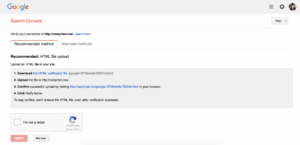
- Verify your ownership using methods like DNS verification, HTML file upload, or Google Analytics.
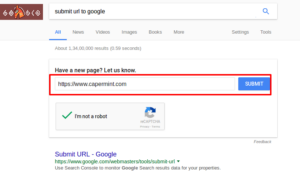
Step 2: Submit Your Sitemap
- Navigate to Sitemaps in Google Search Console.
- Enter your sitemap URL (e.g.,
https://yourwebsite.com/sitemap.xml). - Click ‘Submit’ to inform Google about your site structure.
Step 3: Request Indexing for New Pages
- Go to the URL Inspection Tool in Google Search Console.
- Paste your webpage URL and click ‘Request Indexing’.
- Google will then crawl and index your page faster.
2. How to Submit Your Website to Bing
Bing is another major search engine that can bring traffic to your site.
Step 1: Use Bing Webmaster Tools
- Visit Bing Webmaster Tools (www.bing.com/webmasters).
- Sign in using your Microsoft, Google, or Facebook account.
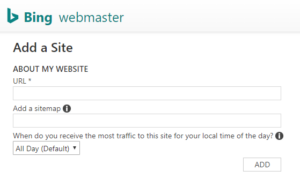
- Click ‘Add a Site’ and enter your website’s URL.
- Verify ownership using the recommended methods.
Step 2: Submit Your Sitemap to Bing
- In Bing Webmaster Tools, go to ‘Sitemaps’.
- Enter your sitemap URL and click ‘Submit’.
- This helps Bing understand your site structure.
3. How to Submit Your Website to Other Search Engines
While Google and Bing dominate, submitting your website to other search engines like Yahoo, DuckDuckGo, and Yandex can increase visibility.
- Yahoo: Yahoo Search is powered by Bing, so submitting to Bing also covers Yahoo.
- DuckDuckGo: This search engine doesn’t have a submission tool, but ensuring proper indexing on Google and Bing helps.
- Yandex: Visit webmaster.yandex.com and follow similar steps as Google Search Console.
4. How to Check if Your Website is Indexed
To ensure that search engines have indexed your website, use these methods:
- Google Search: Type
site:yourwebsite.comin Google to check indexed pages. - Bing Search: Use
site:yourwebsite.comin Bing’s search bar. - Google Search Console & Bing Webmaster Tools: Check the Coverage Report for indexed pages.

5. Common Issues & How to Fix Them
If your site is not indexed, try these solutions:
- Ensure your website is crawlable: Use a robots.txt tester to allow search engine bots.
- Improve website speed: A slow website can prevent indexing. Use Google PageSpeed Insights.
- Fix broken links: Broken links can hurt indexing. Use tools like Screaming Frog to find and fix them.
- Update content regularly: Fresh content encourages search engines to crawl your site.
Final Thoughts
Learning how to submit your website to search engines in 2025 (Google, Bing & More) is crucial for gaining online visibility. By following the steps above, you can ensure faster indexing and better rankings. Make sure to use Google Search Console and Bing Webmaster Tools, submit your sitemap, and monitor your indexing status regularly.
Want to learn more? Check out our guides on SEO strategies and website optimization for continued success!