
Even in 2026, jQuery continues to play a significant role in web development—especially in maintaining legacy systems and quickly building interactive interfaces. While modern JavaScript frameworks dominate new projects, jQuery event handling remains one of the simplest ways to understand how user interaction works in the browser.
In this guide, we’ll go deep into jQuery events with clear explanations, real-world examples, and practical insights—all in a smooth, easy-to-follow flow.
Understanding Events in the Browser
Every time a user interacts with a webpage—whether clicking a button, typing in an input field, or submitting a form—an event is triggered. These events act like signals that tell your code: “Hey, something just happened—do something!”
For example, when a user clicks a button, you can respond by showing a message, loading data, or changing the UI dynamically. This is the foundation of interactivity in web applications.
Why jQuery Events Still Matter Today
Although modern JavaScript provides native ways to handle events, jQuery simplifies the process in a way that is still valuable. It removes cross-browser inconsistencies and provides a cleaner syntax, which is especially helpful for beginners or developers working on older projects.
In real-world scenarios, many companies still maintain applications built with jQuery. Understanding its event system allows you to debug, enhance, and optimize such applications without rewriting everything from scratch.
The Basic Syntax of jQuery Events
At its core, jQuery event handling follows a simple structure:
<span class="ͼ11">$</span>(<span class="ͼ11">selector</span>)<span class="ͼv">.</span>event(<span class="ͼv">function</span>() {
    <span class="ͼt">// code to execute</span>
});
For instance:
<span class="ͼ11">$</span>(<span class="ͼz">"#btn"</span>)<span class="ͼv">.</span>click(<span class="ͼv">function</span>() {
    <span class="ͼ11">alert</span>(<span class="ͼz">"Button clicked!"</span>);
});
This small snippet attaches a click event to a button. When the button is pressed, the function runs instantly. This simplicity is one of jQuery’s biggest strengths.
Exploring Different Types of Events
jQuery supports a wide range of events that cover almost every kind of user interaction. Instead of listing them all, let’s understand them through context.
When users interact with a mouse—clicking, hovering, or moving over elements—mouse events come into play. For example:
<span class="ͼ11">$</span>(<span class="ͼz">"#box"</span>)<span class="ͼv">.</span>mouseenter(<span class="ͼv">function</span>() {
    <span class="ͼ11">$</span>(<span class="ͼy">this</span>)<span class="ͼv">.</span>css(<span class="ͼz">"background"</span>, <span class="ͼz">"blue"</span>);
});
As soon as the mouse enters the element, the background changes. This is commonly used in UI effects and hover animations.
Keyboard events are triggered when users type. These are useful for search boxes, live validation, or real-time feedback:
<span class="ͼ11">$</span>(<span class="ͼz">"#input"</span>)<span class="ͼv">.</span>keyup(<span class="ͼv">function</span>() {
    <span class="ͼ11">console</span><span class="ͼv">.</span>log(<span class="ͼz">"User is typing..."</span>);
});
Form-related events help control submissions and validations. Instead of letting a form submit automatically, you can control the process:
<span class="ͼ11">$</span>(<span class="ͼz">"#form"</span>)<span class="ͼv">.</span>submit(<span class="ͼv">function</span>(<span class="ͼ11">e</span>) {
    <span class="ͼ11">e</span><span class="ͼv">.</span>preventDefault();
    <span class="ͼ11">alert</span>(<span class="ͼz">"Form submission controlled!"</span>);
});
Finally, there are document-level events that run when the page loads:
<span class="ͼ11">$</span>(<span class="ͼ11">document</span>)<span class="ͼv">.</span>ready(<span class="ͼv">function</span>() {
    <span class="ͼ11">console</span><span class="ͼv">.</span>log(<span class="ͼz">"Page fully loaded"</span>);
});
This ensures your code runs only after the DOM is ready.
The Power of .on() Method
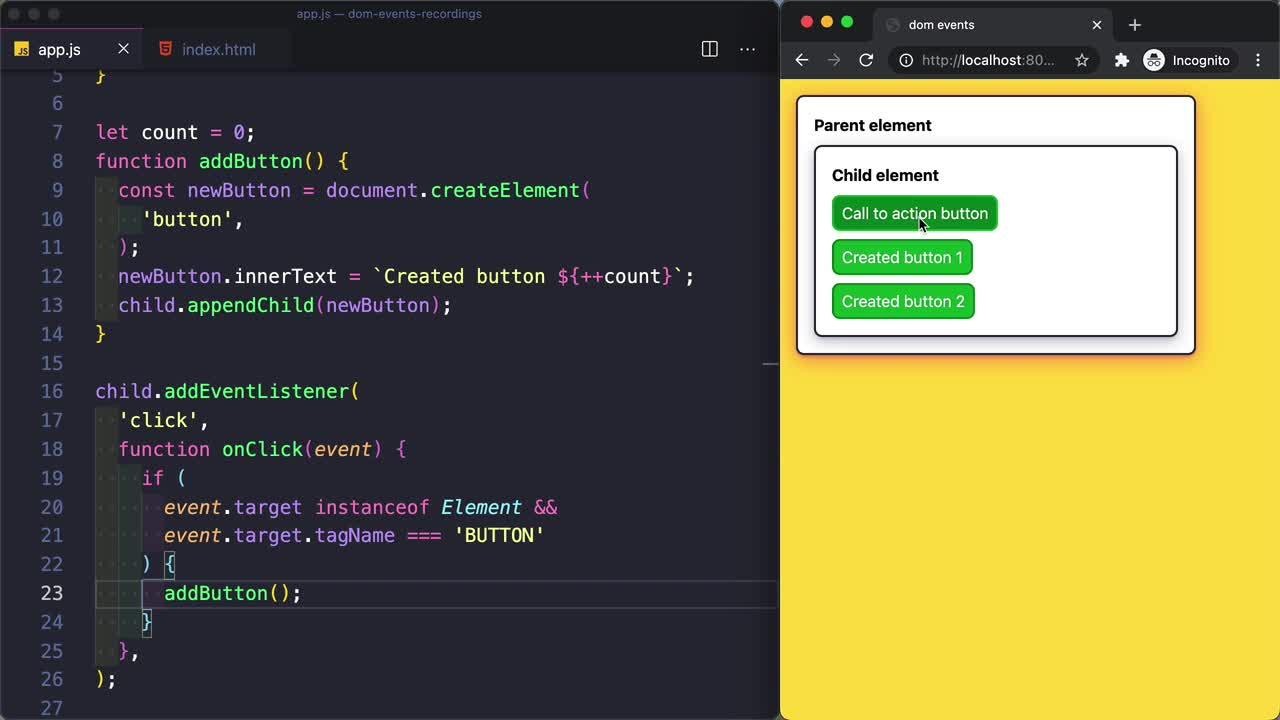
In modern jQuery usage, the .on() method is the preferred way to handle events. It provides flexibility and supports advanced patterns like delegation.
<span class="ͼ11">$</span>(<span class="ͼz">"#btn"</span>)<span class="ͼv">.</span>on(<span class="ͼz">"click"</span>, <span class="ͼv">function</span>() {
    <span class="ͼ11">alert</span>(<span class="ͼz">"Handled with .on()"</span>);
});
What makes .on() powerful is that it can also handle multiple events and dynamically added elements without extra effort.
Event Delegation: A Real-World Superpower
Instead of attaching events to every single element, you can attach one event to a parent and let it handle all child interactions.
<span class="ͼ11">$</span>(<span class="ͼz">"#list"</span>)<span class="ͼv">.</span>on(<span class="ͼz">"click"</span>, <span class="ͼz">"li"</span>, <span class="ͼv">function</span>() {
    <span class="ͼ11">alert</span>(<span class="ͼ11">$</span>(<span class="ͼy">this</span>)<span class="ͼv">.</span>text());
});
This approach is incredibly useful when elements are created dynamically. Even if new <li> items are added later, they automatically inherit the event behavior. This not only improves performance but also keeps your code clean and scalable.
Understanding Event Flow (Bubbling)
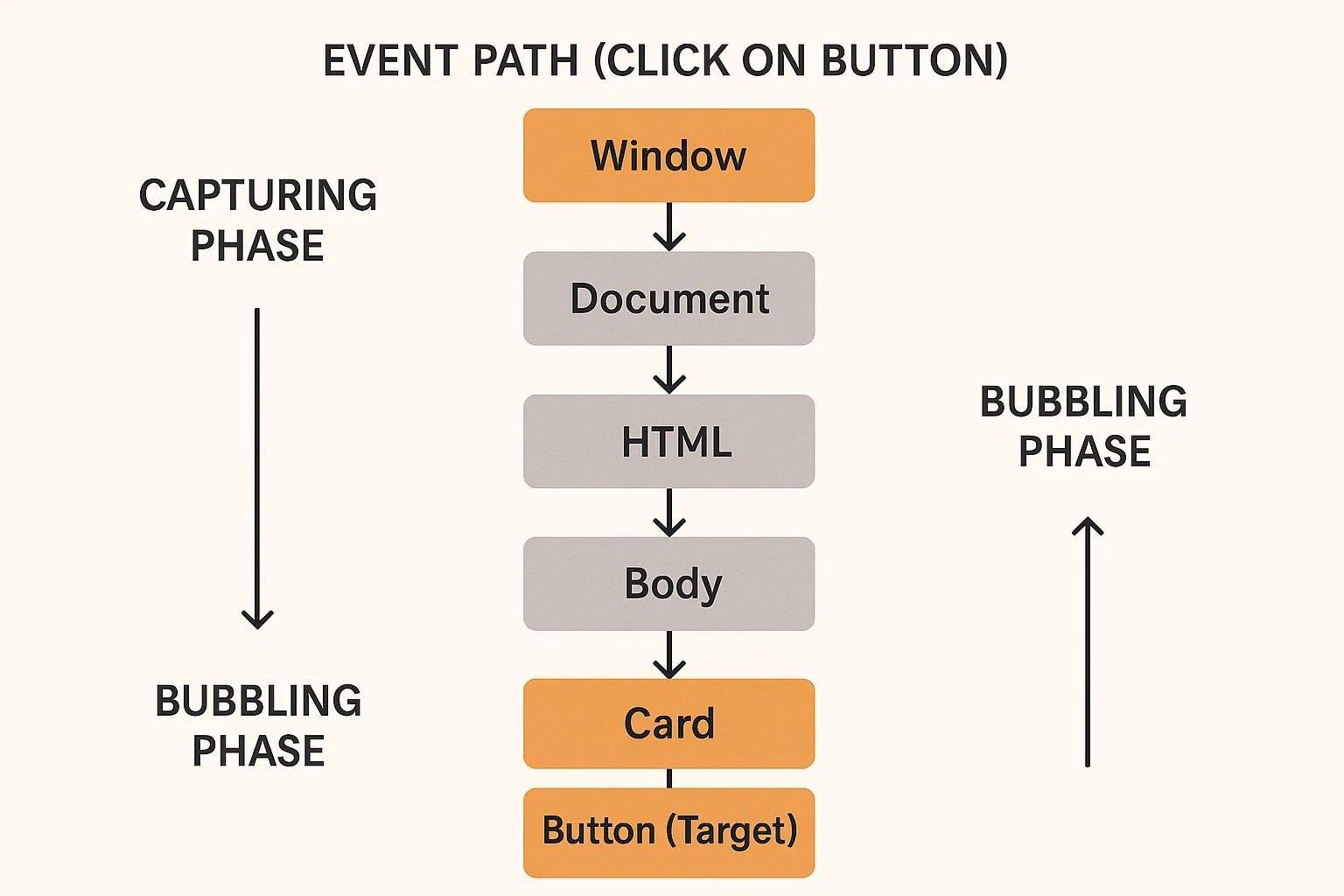
When an event is triggered on an element, it doesn’t stop there. It travels upward through its parent elements—a process called event bubbling.
Sometimes this behavior can cause unexpected results. To stop it, you can use:
<span class="ͼ11">$</span>(<span class="ͼz">"#child"</span>)<span class="ͼv">.</span>click(<span class="ͼv">function</span>(<span class="ͼ11">e</span>) {
    <span class="ͼ11">e</span><span class="ͼv">.</span>stopPropagation();
});
This ensures the event stays only where it was triggered.
Working with the Event Object
Every event handler gives you access to an event object that contains useful details about the interaction.
<span class="ͼ11">$</span>(<span class="ͼz">"#btn"</span>)<span class="ͼv">.</span>click(<span class="ͼv">function</span>(<span class="ͼ11">e</span>) {
    <span class="ͼ11">console</span><span class="ͼv">.</span>log(<span class="ͼ11">e</span><span class="ͼv">.</span>type);
    <span class="ͼ11">console</span><span class="ͼv">.</span>log(<span class="ͼ11">e</span><span class="ͼv">.</span>target);
});
With this, you can know exactly what happened, where it happened, and how to respond accordingly.
Preventing Default Actions
Certain HTML elements come with built-in behavior. For example, clicking a link navigates to another page, and submitting a form reloads the page.
You can override this behavior when needed:
<span class="ͼ11">$</span>(<span class="ͼz">"a"</span>)<span class="ͼv">.</span>click(<span class="ͼv">function</span>(<span class="ͼ11">e</span>) {
    <span class="ͼ11">e</span><span class="ͼv">.</span>preventDefault();
});
This is especially useful in single-page applications and custom UI flows.
Advanced Event Techniques in Practice
As your applications grow, you may need more control over events. jQuery provides advanced methods for handling complex scenarios.
You can attach an event that runs only once:
<span class="ͼ11">$</span>(<span class="ͼz">"#btn"</span>)<span class="ͼv">.</span>one(<span class="ͼz">"click"</span>, <span class="ͼv">function</span>() {
    <span class="ͼ11">alert</span>(<span class="ͼz">"This runs only once"</span>);
});
You can also remove events dynamically:
<span class="ͼ11">$</span>(<span class="ͼz">"#btn"</span>)<span class="ͼv">.</span>off(<span class="ͼz">"click"</span>);And even trigger events manually:
<span class="ͼ11">$</span>(<span class="ͼz">"#btn"</span>)<span class="ͼv">.</span>trigger(<span class="ͼz">"click"</span>);These techniques are often used in larger applications where dynamic control is required.
Real-World Example: Interactive Task List
<span class="ͼ11">$</span>(<span class="ͼ11">document</span>)<span class="ͼv">.</span>ready(<span class="ͼv">function</span>() {

    <span class="ͼ11">$</span>(<span class="ͼz">"#addTask"</span>)<span class="ͼv">.</span>on(<span class="ͼz">"click"</span>, <span class="ͼv">function</span>() {
        <span class="ͼ11">$</span>(<span class="ͼz">"#tasks"</span>)<span class="ͼv">.</span>append(<span class="ͼz">"<li class='task'>New Task</li>"</span>);
    });

    <span class="ͼ11">$</span>(<span class="ͼz">"#tasks"</span>)<span class="ͼv">.</span>on(<span class="ͼz">"click"</span>, <span class="ͼz">".task"</span>, <span class="ͼv">function</span>() {
        <span class="ͼ11">$</span>(<span class="ͼy">this</span>)<span class="ͼv">.</span>toggleClass(<span class="ͼz">"done"</span>);
    });

});
In this example, tasks are added dynamically, and clicking on them toggles their state. The key idea here is that event delegation ensures everything works smoothly—even for newly created elements.
Best Practices for jQuery Event Handling
When working with events, writing clean and efficient code is more important than just making things work. Prefer using .on() instead of older methods, and avoid attaching multiple event handlers unnecessarily. Keeping your event logic lightweight improves performance and makes debugging easier.
Another important habit is to think about scalability. If your application grows, event delegation will save you from rewriting large portions of your code.
jQuery vs Modern JavaScript in 2026
Today, most developers prefer native JavaScript or frameworks for building large applications. However, jQuery still holds its ground in situations where simplicity and speed matter more than architectural complexity.
Learning jQuery events is not just about using a library—it’s about understanding how event-driven programming works in the browser. That knowledge transfers directly to modern tools and frameworks.
Final Thoughts
Mastering jQuery event handling gives you a strong foundation in frontend development. It teaches you how users interact with web pages and how your code should respond in real time.
If you truly understand concepts like event delegation, propagation, and efficient event handling, you’ll find it much easier to work with advanced technologies later.
In 2026, the smartest developers are not the ones who only learn the latest frameworks—but the ones who understand the fundamentals deeply. And jQuery events are one of those fundamentals.
Want to learn more??, Kaashiv Infotech Offers Front End Development Course, Full Stack Development Course And More Visit Our Website www.kaashivinfotech.com.


