


Key Highlights 🚀
✅ What are Tokens in Python?
Table Of Content
- Key Highlights 🚀
- Beginner’s Guide: What are Tokens in Python? 🐍
- Why Are Tokens in Python Important? 🤔
- Exploring the Types of Tokens in Python 🏷️
- 1️⃣ Identifiers in Python 🏷️
- Examples
- 2️⃣ Keywords in Python 🔑
- 3️⃣Understanding Literals in Python 🔢
- Examples
- 4️⃣ Operators in Python ➕
- Example
- 5️⃣ Punctuation in Python 📌
- Example
- Mastering Tokens in Python: Final Thoughts 🎯
- FAQs ❓
- 🔹 What is a token in programming?
- 🔹 What is the Tokenize function in Python?
- 🔹 What are the lists of tokens in Python?
✅ Importance of Tokens in Python 📌
✅ Types of Tokens: Identifiers, Keywords, Literals, Operators, Punctuation
✅ Practical examples and explanations 💡
✅ Frequently Asked Questions (FAQs) ❓
Beginner’s Guide: What are Tokens in Python? 🐍
Tokens in Python are the smallest elements of a Python program that hold meaning. These tokens serve as the foundation of the Python language and are essential for the interpreter to analyze and execute the code efficiently. Without tokens, Python syntax wouldn’t exist!
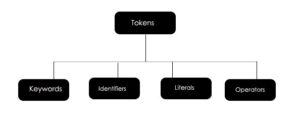
Tokens in Python are divided into five main categories:
- Identifiers 🏷️
- Keywords 🔑
- Literals 🔢
- Operators ➕
- Punctuation 📌
Understanding these tokens is crucial for writing clean and efficient Python code. Now, let’s explore why tokens matter!
Why Are Tokens in Python Important? 🤔
Tokens play a vital role in Python programming by ensuring:
✅ Syntax Understanding and Parsing – Tokens define Python’s grammar and structure.
✅ Code Readability – They help in writing structured and readable code.
✅ Error Detection and Debugging – Tokens assist in identifying syntax errors.
✅ Program Structure and Flow Control – They help define loops, functions, and conditionals.
✅ Data Representation – Tokens store and manipulate data efficiently.
Exploring the Types of Tokens in Python 🏷️
1️⃣ Identifiers in Python 🏷️
Identifiers are names used to represent variables, functions, classes, and objects in Python.

Rules for Identifiers:
✔️ Must start with a letter (A-Z or a-z) or an underscore (_)
✔️ Can be followed by letters, digits (0-9), or underscores (_)
✔️ Cannot be a Python keyword
✔️ Case-sensitive (e.g., MyVariable and myvariable are different)
Examples:
my_variable = 10
_variable = 30
variable123 = 40
2️⃣ Keywords in Python 🔑
Keywords are reserved words in Python that have special meanings and cannot be used as identifiers.
🔹 Python has 35 keywords, including:
and, as, assert, break, class, continue, def, del, elif, else, except,
False, finally, for, from, global, if, import, in, is, lambda,
None, nonlocal, not, or, pass, raise, return, True, try, while, with, yield
❌ Incorrect Usage: def = 10 (❌ ‘def’ is a reserved keyword)
✅ Correct Usage: my_function = 10 (✅ ‘my_function’ is an identifier)

3️⃣Understanding Literals in Python 🔢
Literals are constant values assigned to variables. They are classified into:

- String Literals: Text enclosed in single (
'), double ("), or triple ('''or""") quotes. - Numeric Literals: Integers (
42), floating-point numbers (3.14), and complex numbers (3+4j). - Boolean Literals:
TrueorFalse. - Special Literals:
None(represents absence of a value).
Examples:
string_literal = "Hello, Python!"
integer_literal = 42
float_literal = 3.14
boolean_literal = True
special_literal = None
4️⃣ Operators in Python ➕
Operators perform operations on variables and values.
Types of Operators:
- Arithmetic Operators:
+,-,*,/,%,**,// - Comparison Operators:
==,!=,>,<,>=,<= - Logical Operators:
and,or,not - Assignment Operators:
=,+=,-=,*=,/=,%=,**=,//= - Bitwise Operators:
&,|,^,~,<<,>>
Example:
a, b = 5, 10
print(a + b)  # Output: 15
print(a > 2 and b < 15)  # Output: True
5️⃣ Punctuation in Python 📌
Punctuation symbols are used to structure Python code.
Common punctuation in Python includes:
- Parentheses
()– Used for function calls and grouping expressions. - Brackets
[]– Used for lists and array indexing. - Braces
{}– Used to define dictionaries and sets. - Colon
:– Used in function definitions, loops, and conditionals. - Comma
,– Used to separate values in lists, tuples, and function arguments. - Dot
.– Used for attribute access. - Semicolon
;– Used to separate multiple statements on a single line (rarely used in Python).

Example:
def greet():
    print("Hello, Python!")  # Function call using parentheses
Mastering Tokens in Python: Final Thoughts 🎯
Tokens in Python form the building blocks of Python programming. Mastering them allows you to write clean, readable, and efficient Python code. Understanding identifiers, keywords, literals, operators, and punctuation will help you become a better Python developer!
💡 Want to take your Python skills to the next level? Start practicing Python projects and explore advanced concepts like OOP, recursion, and error handling!
FAQs ❓
🔹 What is a token in programming?
A token is the smallest unit of code that carries meaning. In Python, tokens include identifiers, keywords, literals, operators, and punctuation.
🔹 What is the Tokenize function in Python?
The tokenize module in Python allows you to break down Python code into its fundamental tokens for analysis and debugging.
🔹 What are the lists of tokens in Python?
Python tokens include:
- Identifiers (variable & function names)
- Keywords (reserved words)
- Literals (constants like numbers and strings)
- Operators (symbols for operations)
- Punctuation (delimiters and structure-defining symbols)
🎯 Start coding today and master Python tokens! 🚀


I really appreciate how this post breaks down the different types of tokens in Python. It’s easy to forget how important each piece is when writing code, but they really are the building blocks of good structure and readability.