What is cloud storage? It is a technology that allows users to store digital files (like documents, photos, videos, etc.) on remote servers rather than keeping them on local devices. These servers are maintained by cloud service providers (CSPs) and are accessible via the internet.
Table Of Content
- Key Terminologies
- What is Cloud Storage?
- How Cloud Storage Works
- Step-by-Step Process
- Types of Cloud Storage
- 1️⃣ Public Cloud Storage
- 2️⃣ Private Cloud Storage
- 3️⃣ Hybrid Cloud Storage
- 4️⃣ Multi-Cloud Storage
- Real-World Cloud Storage Overview Examples
- Advantages of Cloud Storage
- Challenges & Concerns
- Popular Cloud Storage Providers
- Tips for Securing Cloud Data
- How to Choose the Right Cloud Storage Provider
- Conclusion: What Is The Cloud Storage & Why It Matters
Instead of saving data on a hard drive or USB, this lets you access and manage files from anywhere with an internet connection. It is widely used in CSE (Computer Science & Engineering), AI (Artificial Intelligence), cybersecurity, networking, hacking, and cloud computing for storing and managing vast amounts of data efficiently.
Key Terminologies
🔑To understand cloud storage better, let’s explore some essential terms:
- Cloud Computing – A model that provides on-demand computing resources (like storage, processing power, and applications) over the internet.
- Data Center – A facility with interconnected servers that store and manage cloud data.
- Redundancy – The practice of storing multiple copies of data across different locations to prevent data loss.
- Scalability – The ability to adjust storage capacity based on user demand.
- Encryption – A security measure that converts data into a coded format to prevent unauthorized access.
What is Cloud Storage?
Cloud storage is a digital storage solution that allows you to save and access your files (like documents, photos, videos, and backups) over the internet instead of using your local device like a hard drive or USB stick.
In simple terms, when you upload a file to cloud storage, it is stored on powerful remote servers maintained by companies like Google, Amazon, or Microsoft. These files can then be accessed anytime, from anywhere, using an internet connection—whether you’re on a laptop, smartphone, or tablet.
How Cloud Storage Works
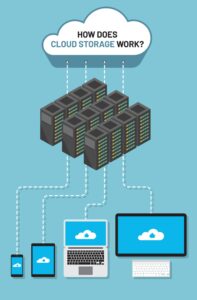
🌐Cloud storage works by transmitting data from your device to a remote server via the internet.
Step-by-Step Process
- Uploading – When you save a file to the cloud, it is sent and stored on a remote server.
- Synchronization – Cloud services ensure that your files are updated across multiple devices in real-time.
- Access Control – Users can set permissions to determine who can view, edit, or share files.
- Backup & Recovery – Cloud storage provides automatic backups to prevent data loss.
Types of Cloud Storage
🔥 There are different types based on usage and architecture:
1️⃣ Public Cloud Storage
- Data is stored on shared servers managed by third-party providers.
- Examples: Google Drive, Dropbox, Microsoft OneDrive.
- ✅ Cost-effective but ❌ less control over security.
2️⃣ Private Cloud Storage
- Dedicated storage infrastructure for a single organization.
- Example: A company’s internal cloud storage.
- ✅ More security & control but ❌ higher cost.
3️⃣ Hybrid Cloud Storage
- Mix of public and private cloud storage.
- Example: A healthcare provider storing patient data privately but using public storage for general documents.
- ✅ Best of both worlds but ❌ requires proper management.
4️⃣ Multi-Cloud Storage
- Using multiple cloud providers for flexibility and backup.
- Example: A company using AWS for databases and Google Cloud for documents.
- ✅ No single-provider dependency but ❌ requires integration efforts.

Real-World Cloud Storage Overview Examples
- Netflix – Uses AWS to host and stream billions of hours of video content globally.
- Tesla – Stores autonomous driving data in the cloud for AI model training and updates.
- NASA – Uses cloud platforms to manage satellite data and collaborate on space research.
- Hospitals – Store patient records securely online for easy access and compliance with regulations.
- GitHub – Hosts millions of open-source projects, allowing developers to collaborate and share code.
Advantages of Cloud Storage
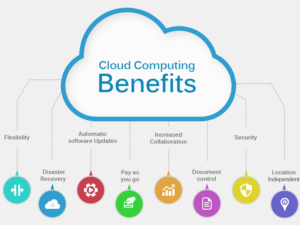
- Accessibility – Access files from any device with an internet connection.
- Cost-Effectiveness – No need to buy expensive storage devices.
- Scalability – Increase or decrease storage as needed.
- Automatic Backup – Reduces the risk of data loss.
- Collaboration – Teams can work on shared files in real-time.
Challenges & Concerns
- Internet Dependency – Requires a stable connection.
- Security Risks – Potential vulnerability to cyberattacks.
- Data Privacy – Sensitive information on third-party servers may raise concerns.
- Limited Free Storage – Most providers charge beyond a certain limit.
Popular Cloud Storage Providers
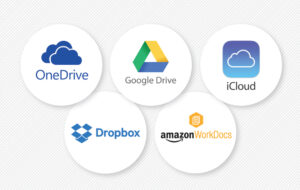
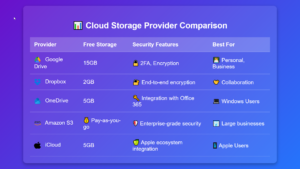
- Google Drive – Integrated with Google services, offers 15GB free storage.
- Dropbox – Easy file sharing and collaboration.
- Microsoft OneDrive – Best for Windows users, integrated with Office 365.
- Amazon S3 – Used for large-scale enterprise storage.
- iCloud – Apple’s cloud storage for Mac and iPhone users.
Tips for Securing Cloud Data
To ensure your data is safe, follow these best practices:
- Enable Two-Factor Authentication (2FA) – Adds an extra layer of security beyond just a password.
- Use Strong Passwords – Create unique, complex passwords for your accounts.
- End-to-End Encryption – Choose a provider that encrypts your data before it leaves your device.
- Regular Backups – Even though cloud platforms have redundancy, always have an extra backup.
- Review Permissions – Limit who can access, edit, or share your files.
- Avoid Public Wi-Fi for Access – Use a VPN if accessing sensitive data from an unsecured network.
How to Choose the Right Cloud Storage Provider
When selecting a service, consider:
- Storage Capacity – How much space do you need?
- Security & Compliance – Does it offer encryption and meet data protection laws (GDPR, HIPAA)?
- Cost & Pricing Model – Free vs. paid plans, pay-as-you-go options.
- Integration – Works with your existing apps and devices.
- Performance & Speed – How fast can you upload/download data?

Conclusion: What Is The Cloud Storage & Why It Matters
Cloud storage is an essential technology that enables convenient, scalable, and secure data storage over the internet. Whether for personal use or businesses, understanding different types, advantages, and challenges helps in making an informed choice about using online storage effectively.
By implementing proper security measures and choosing the right provider, users can maximize the benefits while minimizing risks.