Hey there! If you’ve ever wondered how your phone talks to your Wi-Fi router, how offices stay connected, or how the internet spans the entire globe, you’re in the right place.
In simple words — a computer network is just a bunch of devices (computers, phones, printers, servers) talking to each other. And depending on how big the area is and what you need, we divide them into different types of networks.
Let’s break them down one by one in plain English!
What Is a Computer Network Exactly?
Think of a network like a group chat.
Instead of people texting, devices are sharing files, internet, printers, or messages.
Some networks are tiny (your home Wi-Fi), some cover a whole city, and some literally connect continents.
Now, let’s jump into the most common types of networks everyone should know in 2025.
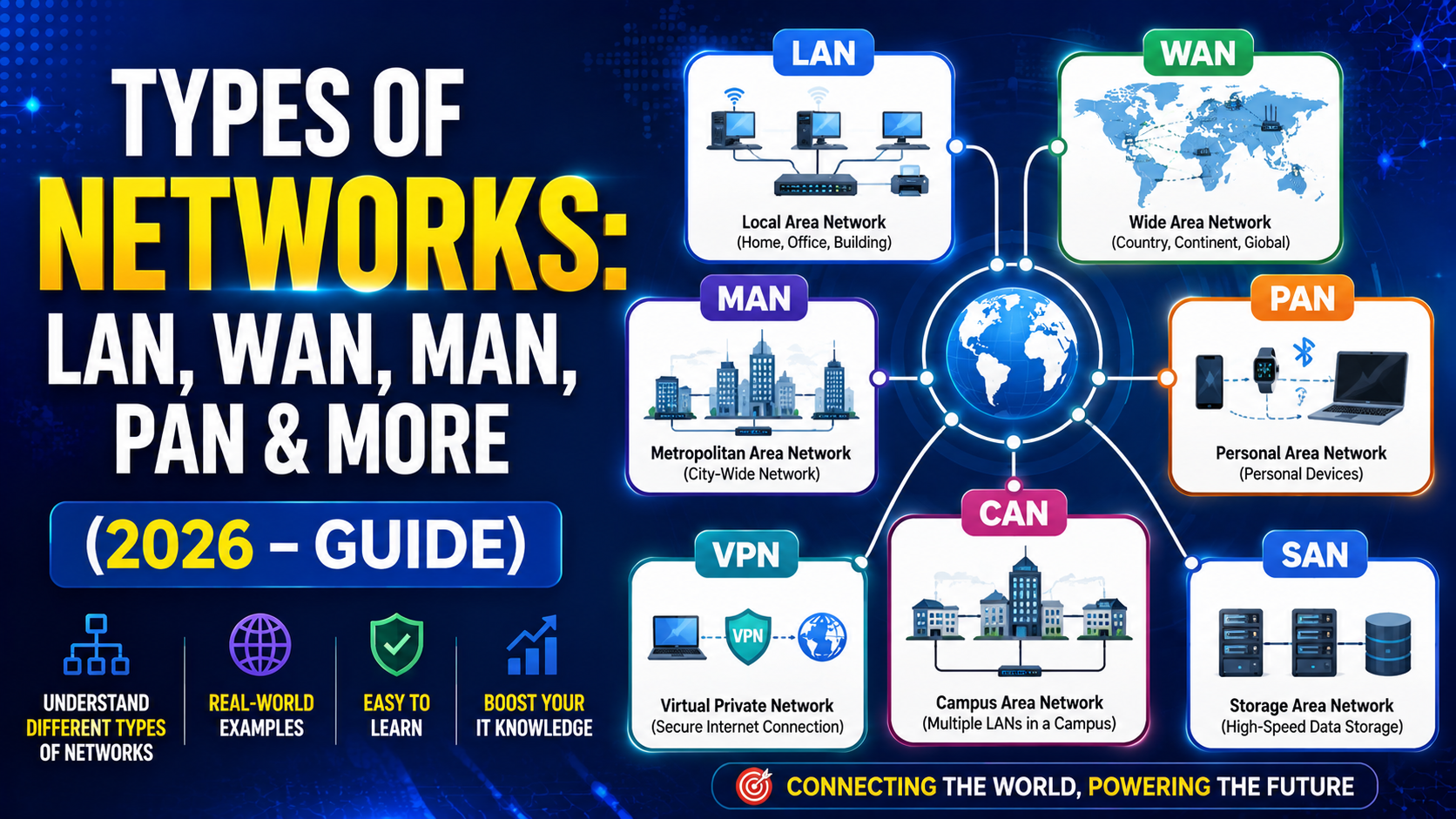
1. Personal Area Network (PAN)
The smallest type of network — usually within 10 meters.
- Perfect example: Connecting your phone to wireless earbuds via Bluetooth, or your smartwatch to your laptop.
- Range: Up to 10–20 meters
- Speed: Decent (Bluetooth 5 can hit 2 Mbps)
- Cost: Almost free

Pros:
- Super easy to set up
- Low power consumption
- Great for personal gadgets
Cons:
- Very limited range
- Not meant for sharing heavy files
Fun fact: Your phone automatically creates a PAN when you tether your laptop to mobile data!
2. Local Area Network (LAN) – The Office or Home Hero
This is what most of us use daily.
- Covers a single building or campus (up to a few hundred meters)
- Wired (Ethernet cables) or wireless (Wi-Fi)
Real-life examples:
- Your home Wi-Fi
- Office network where everyone shares printers and files
- School computer labs
Pros:
- Lightning-fast speed (up to 1 Gbps or more)
- Very secure (because it’s private)
- Cheap to set up
Cons:
- Limited distance – cables or Wi-Fi signals don’t travel far
- Needs someone to manage if it grows big
3. Wireless Local Area Network (WLAN) – LAN Without Wires
Same as LAN but completely wireless. Your home Wi-Fi is technically a WLAN!
Key differences from traditional LAN:
- Uses radio waves instead of cables
- Slightly slower and less secure if not configured properly (use WPA3!)
Pros:
- Move freely with your laptop or phone
- Easy to add new devices
- No messy cables
Cons:
- Interference from microwaves, walls, or neighbor’s Wi-Fi
- Slightly higher security risk if password is weak
4. Campus Area Network (CAN) – Bigger Than LAN, Smaller Than MAN
Used in universities, large schools, or corporate campuses.
- Connects multiple buildings in the same area (1–5 km)
- Combines several LANs together
Example: All departments in a university sharing the same internet and files.
Pros:
- Faster and cheaper than WAN
- Easy to scale as campus grows
Cons:
- Still limited to one location
5. Metropolitan Area Network (MAN) – City-Wide Network
Covers an entire city or large campus (up to 50–100 km).
- Often owned by government or big ISPs
- Example: City-wide free Wi-Fi or cable TV networks
Pros:
- High speed using fiber optic cables
- Connects multiple offices in the same city cheaply
Cons:
- Expensive to build and maintain
- Higher security risk because it’s larger
6. Wide Area Network (WAN) – The Giant
The biggest type — connects cities, countries, even continents.
The internet itself is the largest WAN!
Other examples:
- Bank ATMs across the country
- Company branches in different states connected together
Pros:
- Connects the world
- Centralized resources (cloud storage, anyone?)
Cons:
- Slower speed compared to LAN
- Expensive and complex
- More security threats
7. Other Important Types of Networks You Should Know
Storage Area Network (SAN)
- Not for people — for data!
- Super-fast network just to move huge files between servers and storage devices
- Used by big companies and cloud providers
Virtual Private Network (VPN)
- Creates a secure “tunnel” over the internet
- Makes you look like you’re browsing from another country
- Must-have for privacy and remote work in 2026
Passive Optical LAN (POLAN)
- Modern replacement for traditional copper LAN
- Uses fiber optics + passive splitters = less equipment, lower cost in long run
Enterprise Private Network (EPN)
- Big companies build their own private highways on the internet
- Super secure and fast for internal use
H2: Quick Comparison Table: LAN vs MAN vs WAN vs PAN
| Feature | PAN | LAN | MAN | WAN |
|---|---|---|---|---|
| Coverage | 10 meters | One building | Entire city | Countries/Globe |
| Speed | Low–Medium | Very High | High | Medium–Low |
| Cost | Very Low | Low | High | Very High |
| Ownership | Individual | Private | Govt/ISP | Multiple |
| Example | Bluetooth | Home Wi-Fi | City Wi-Fi | The Internet |
H2: Which Network Type Should You Choose?
- Just connecting phone + laptop → PAN or WLAN
- Home or small office → LAN/WLAN
- University or large campus → CAN
- Multiple offices in same city → MAN
- Remote employees or global company → WAN + VPN
Conclusion
There you go — the complete 2026 guide to types of networks explained like you’re chatting with a friend!
From your tiny Bluetooth PAN to the massive WAN we call the internet, every network has its own superpower. Understanding them helps you choose the right setup for home, study, or business — and even impress your friends the next time someone asks, “Wait, what’s the difference between LAN and WAN again?”
At Kaashiv Infotech, we help students and professionals master networking, cybersecurity, cloud, and full-stack development through real-time internships and projects. Want to build and manage networks yourself? Check out our CCNA, Ethical Hacking, or AWS courses — live projects guaranteed!
FAQs (Based on Google’s “People Also Ask”)
- What are the 4 main types of networks?
The four basic types are PAN (Personal), LAN (Local), MAN (Metropolitan), and WAN (Wide Area). Everything else (WLAN, VPN, SAN) is built on top of these. - Which is faster — LAN or WAN?
LAN is much faster (up to 10 Gbps today) because devices are close together. WAN is slower because data has to travel long distances. - What is the difference between LAN and WLAN?
LAN can be wired or wireless. WLAN is purely wireless (your Wi-Fi). Speed and security are slightly better with wired LAN. - Is the internet a LAN or WAN?
The internet is the biggest WAN in the world! - Why do we need different types of networks?
Different sizes and needs! A home doesn’t need a city-wide network, and a global company can’t run everything on home Wi-Fi. Each type fits its own purpose perfectly.