

Google Alerts for Job Search: Stop Wasting Time on Job Portals – Receive Job Postings Automatically With This Simple Trick

Are you tired of endlessly scrolling through job portals like LinkedIn, Naukri, and Indeed? Do you feel lost in the process, wasting hours applying for jobs, only to pass up actual good opportunities, because by the time you saw it the application time is already over? You’re not alone.
Table Of Content
- 🔍 The Smarter Way: Automate Your Job Search With Google Alerts
- ✅ How to Set Up Google Alerts for Job Search (Step-by-Step Guide)
- 💡 Step 1: Go to Google Alerts
- 🔍 Step 2: Enter Your Job Role & Keywords
- ⚙️ Step 3: Customize Filters for Better Results
- 🚀 Step 4: Create & Manage Your Alerts
- 🎯 Why Google Alerts for Job Search is a Game-Changer
- 🔥 Pro Tips to Maximize Your Job Search With Google Alerts
- 🤔 FAQs About Google Alerts for Job Search
- ❓ 1. Is Google Alerts better than job portals like LinkedIn?
- ❓ 2. How many job alerts can I create?
- ❓ 3. Can I use Google Alerts for a specific company?
- ❓ 4. Will I get spammed with emails?
- ✅ Conclusion: Stop Wasting Time, Automate Your Job Search Today!
I’ve been there too. Applying for jobs across multiple platforms, tracking applications manually, and then struggling to remember where I even applied—it was a nightmare. But then, I found a simple trick to automate my job search and make the process effortless.
That trick? Google Alerts for job search 🚀
🔍 The Smarter Way: Automate Your Job Search With Google Alerts
Instead of checking multiple job portals daily, why not have relevant job postings delivered straight to your inbox as soon as they are published? With Google Alerts for job search, you can sit back and let Google do the work for you.
✅ How to Set Up Google Alerts for Job Search (Step-by-Step Guide)
💡 Step 1: Go to Google Alerts
Visit Google Alerts. Google Alerts is a free tool that tracks specific keywords and sends email notifications whenever new content related to those keywords appears online.
🔍 Step 2: Enter Your Job Role & Keywords
In the search field, enter your desired job title or keywords to filter job postings. Examples:
-
- “Software Engineer jobs in Chennai”
- “Digital Marketing Manager remote”
- “UI/UX Designer freelance”
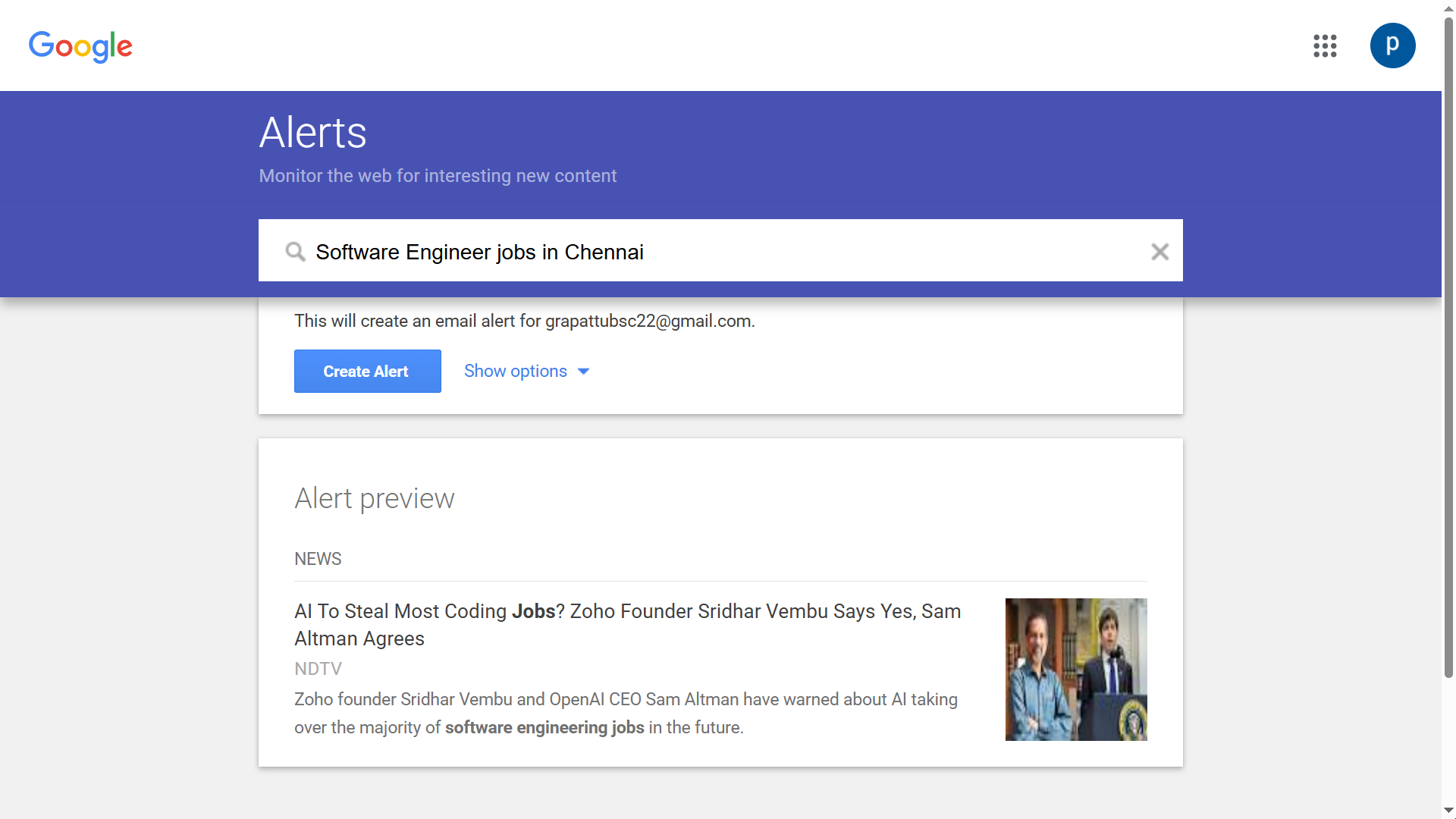
Want more refined results? Add specific filters:
- 📍 Location: “Software Developer jobs Chennai”
- 🛠️ Skills: “Python Developer job openings”
- 🏢 Company Name: “Amazon hiring software engineer”
⚙️ Step 3: Customize Filters for Better Results
Click “Show Options” to refine your job alerts:
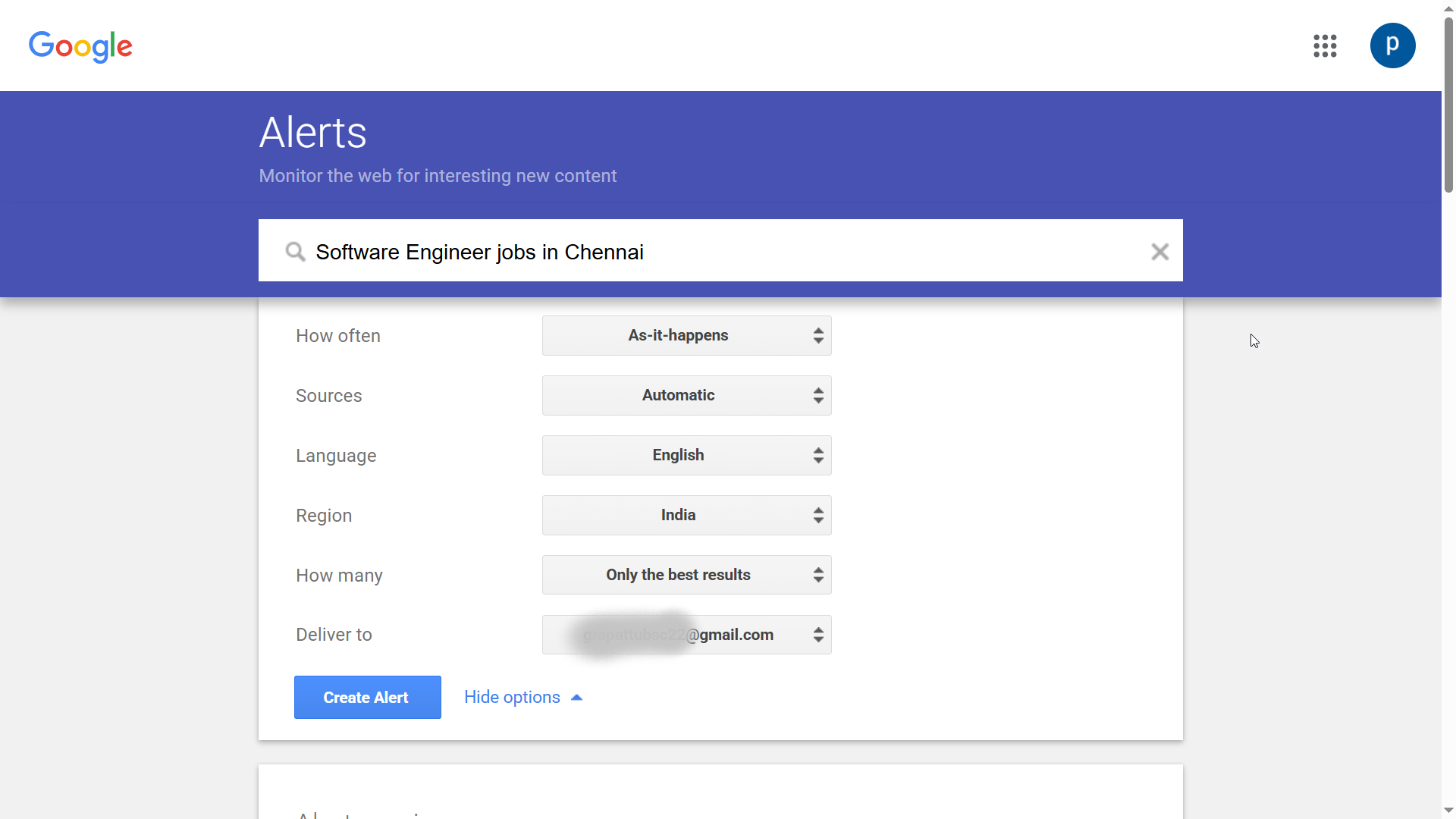
- How often? Choose “As-it-happens” or “Once a day.”
- Sources? Select “Web,” “News,” or “Blogs” to get the best job listings.
- Region? Pick your preferred country or leave it open for global job opportunities.
- Language? Choose the language you want job alerts in.
- Email Delivery? Enter your email address to receive job postings instantly.
🚀 Step 4: Create & Manage Your Alerts
Once you’ve configured your filters, click “Create Alert”. Boom! You’re all set to receive job postings automatically to your inbox.
Want to tweak your alerts? Simply go back to Google Alerts and modify or delete them anytime.
🎯 Why Google Alerts for Job Search is a Game-Changer
- ⏰🚫 Saves Time: No more refreshing job portals every few hours.
- 🚀🔔 Never Miss an Opportunity: Get notified as soon as new jobs are posted.
- 📥📑 Stay Organized: All job postings land in your inbox, making it easier to track applications.
- 💸❌ Completely Free!: Unlike premium job search tools, Google Alerts is 100% free.
🔥 Pro Tips to Maximize Your Job Search With Google Alerts
- 🔎✨ Use Multiple Alerts: Create multiple alerts with different keywords to cover more job postings.
- 🔍⚙️ Use Boolean Search Operators: Make your alerts more precise by using AND, OR, and quotes.
- 📌🔧 Example: “Software Engineer” AND “Remote” will show only remote software engineering jobs.
- ⚡📤 Apply Quickly: When you get an alert, don’t wait! Apply immediately to improve your chances of landing an interview.
- 📧⏱️ Follow Up: If you haven’t heard back in a week, send a follow-up email.
🤔 FAQs About Google Alerts for Job Search
❓ 1. Is Google Alerts better than job portals like LinkedIn?
Google Alerts doesn’t replace job portals but makes it easier to track job postings without spending hours searching.
❓ 2. How many job alerts can I create?
Google doesn’t limit the number of alerts, so you can create as many as you need.
❓ 3. Can I use Google Alerts for a specific company?
Yes! Just enter the company name along with “hiring” or “job openings” (e.g., “Google hiring software engineer”).
❓ 4. Will I get spammed with emails?
No, you control the frequency of alerts. Set it to “Once a day” to avoid too many emails.
✅ Conclusion: Stop Wasting Time, Automate Your Job Search Today!
If you’re tired of endlessly searching for jobs and want to streamline your job hunt, setting up Google Alerts for job search is the smartest move you can make. You’ll receive relevant job postings automatically without having to browse multiple job portals.
🔥 Try it today and let the jobs come to you instead of the other way around!
Know someone who’s job hunting? Share this article with them and help them simplify their search too! 🚀
🔗 Want to uncover hidden internship and job opportunities that others are missing? Check out SECRET Google Job Search Tricks for LinkedIn – FREE INTERNSHIP and supercharge your job hunt!
Uncertain about how to get a job referral?  We recommend reading Employee Referrals: Discover 3 Secret Job Referral Sites for Faster Hiring!
  to boost your chances of getting hired!
Bookmark us for more career tips and stay ahead of the game! 🎯

[…] Also, instead of endlessly scrolling through job portals, let Google Alerts do the heavy lifting. You’ll get automatic notifications for relevant job postings, saving you time and effort.👉 Google Alerts for Job Search: Stop Wasting Time on Job Portals – Receive Job Postings Automaticall… […]