


Key Highlights:
- What is Apache? 🤔 Understanding its role in web hosting.
- How Does Apache Work? ⚙️ A breakdown of its architecture and components.
- Apache Working Explained 🔄 Step-by-step request processing.
- Case Study 📌 A real-world example of Apache in action.
- Final Thoughts 💡 Why Apache remains a key player in web hosting.
Introduction 🌍
When it comes to web servers, Apache is one of the most popular choices, powering over 40% of websites worldwide. How does Apache work? This question is crucial for developers, system administrators, and businesses relying on web-based applications.
Table Of Content
- Key Highlights
- Introduction 🌍
- How Does Apache Work with Web Application Architecture 🏗️
- 1. Client-Side 🖥️
- 2. Server-Side 🖧
- 3. Database 🗄️
- 4. Infrastructure 🏢
- What is Apache? 🌐
- How Does Apache Work? ⚡
- 1. Listener 👂
- 2. Multi-Processing Module (MPM) 🔄
- 3. Request Handler 📝
- 4. Content Generator 🏭
- 5. Response Sender 📡
- Case Study: How Does Apache Work With Web Request 🧐
- Final Thoughts 💡
Apache is an open-source, cross-platform web server developed by the Apache Software Foundation. Known for its stability, security, and flexibility, Apache seamlessly integrates with multiple technologies. In this article, we will explore Apache working in detail, explaining its architecture, components, and how it processes requests efficiently.
How Does Apache Work with Web Application Architecture 🏗️
Before understanding how Apache works, it’s essential to know how web applications are structured. A typical Web Application Architecture consists of:
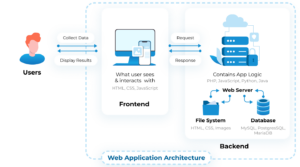
1. Client-Side 🖥️
The client-side represents the user’s browser where the web application runs. The code here is written in HTML, CSS, and JavaScript, responsible for rendering the UI and handling user interactions.
While Apache does not directly influence the client-side, it serves static files (HTML, CSS, JS, images, fonts, etc.), making them accessible to the browser.
2. Server-Side 🖧
The server-side consists of backend applications written in PHP, Python, Java, Node.js, etc. Apache acts as a middleman between the client and the backend, handling HTTP requests and serving content dynamically.
3. Database 🗄️
Web applications store data in databases like MySQL, PostgreSQL, and MongoDB. Apache doesn’t directly interact with the database but helps fetch and serve database-driven dynamic content.
4. Infrastructure 🏢
Infrastructure includes servers, operating systems, and networking. Apache is a core part of web infrastructure, working alongside other tools to enhance performance and security.
What is Apache? 🌐
Apache, officially known as the Apache HTTP Server, is a free and open-source web server that serves web pages to users over the internet. It supports multiple protocols, including:
- HTTP/HTTPS 🌍 (for web pages)
- FTP 📂 (for file transfers)
Apache is highly customizable due to its modular architecture, allowing developers to enable or disable features as needed.

How Does Apache Work? ⚡
Apache processes client requests using a well-defined workflow. Let’s break down Apache working into its core components:
1. Listener 👂
The listener is responsible for accepting incoming connections from web clients (browsers, applications, etc.).
- Listens on port 80 for HTTP and port 443 for HTTPS.
- Accepts the request and forwards it for processing.
2. Multi-Processing Module (MPM) 🔄
MPM is crucial for handling multiple client requests simultaneously. Apache supports different MPMs:
- Prefork MPM 🏗️: Each request gets a separate child process.
- Worker MPM ⚡: Uses threads for handling multiple requests.
- Event MPM 🚀: Efficiently manages persistent connections.
3. Request Handler 📝
The Request Handler determines how Apache should respond to the incoming request. It:
- Reads URL paths and headers
- Determines if the request is for static or dynamic content
- Routes the request accordingly
4. Content Generator 🏭
This module generates responses based on the request type:
- Static content 📄: Serves pre-existing files like HTML, CSS, and images.
- Dynamic content 🖥️: Passes requests to backend applications (PHP, Python, Node.js, etc.).
- Compression & Caching 🚀: Improves performance by reducing response size.
5. Response Sender 📡
After generating the content, Apache sends the HTTP response back to the client.
- Includes status codes (e.g., 200 OK, 404 Not Found).
- Adds response headers (e.g., Content-Type, Cache-Control).
- Sends compressed data for faster loading.

Case Study: How Does Apache Work With Web Request 🧐
Let’s consider an example where a user requests http://example.com/index.html:
- Listener 👂: The browser connects to
port 80, and Apache’s listener accepts the request. - MPM 🔄: A new process or thread is allocated to handle the request.
- Request Handler 📝: Analyzes the request and identifies
index.htmlas a static file. - Content Generator 🏭: Reads
index.htmlfrom disk and applies compression. - Response Sender 📡: Sends the file back to the client with headers.
✅ Result: The user sees the index.html page in their browser.
Final Thoughts 💡
Apache continues to be a reliable and powerful web server, helping websites handle HTTP requests effectively. Understanding how Apache works can help developers and system administrators optimize performance, security, and scalability.
By leveraging Apache working mechanisms, businesses can create a robust hosting environment, ensuring smooth and efficient web operations. Whether serving static pages or dynamic applications, Apache remains a top choice in modern web development.
🚀 Want to dive deeper? Explore advanced topics like Apache performance tuning, security configurations, and load balancing to enhance your server’s efficiency!



I really like the breakdown of Apache’s request processing. Its modular structure and flexibility definitely contribute to its solid performance. I’m curious, though, how does Apache handle large-scale traffic spikes in production environments?
I appreciate the step-by-step breakdown of Apache’s request handling process. It’s easy to see how its modular architecture allows web admins to customize and scale their setups based on traffic needs.
Nice Post.
Good post.