


Figma is a powerful and versatile design tool used by both designers and developers to create visually stunning user interfaces, prototypes, and web designs. If you’re looking to hone your design skills or build a portfolio, working on real-world projects can provide hands-on experience and showcase your abilities to potential employers or clients.
Table Of Content
- Why Figma?
- Figma Project Ideas
- 1. IoT Smart Home Dashboard
- 2. Virtual Art Gallery UI
- 3. Interactive Recipe App
- 4. AI-Powered Personal Finance App
- 5. Voice Assistant Interface Design
- 6. Event Booking Platform UI
- 7. Job Listing Website UI
- 8. E-Commerce Store UI
- 9. Personalized Book Recommendation App
- 10. Mood-Based Music Recommendation App
In this article, we’ll explore 10 exciting Figma project ideas that you can try out, along with access to source code to help guide your process. Whether you’re a beginner looking to get started or an experienced designer wanting to challenge yourself, these ideas will provide you with inspiration and practical knowledge to improve your design expertise.
Why Figma?
Figma stands out as a design tool because it’s cloud-based, allowing for easy collaboration and real-time feedback from teammates. It also offers vector editing, prototyping, and seamless integration with other tools. These features make Figma an ideal platform for designing and prototyping a wide range of projects, from websites to mobile apps.
Figma Project Ideas:
1. IoT Smart Home Dashboard
Time Taken: 3-4 days
Project Complexity: Medium
Technology Stack/Required Tools and Plugins:
Use Figma for the design, along with the Unsplash Plugin for sourcing relevant images of smart homes or devices. The Iconify Plugin can help you find icons for devices like thermostats, lights, and security cameras. You can also use the Google Fonts Plugin for choosing fonts that are clear and readable.
Design a dashboard that allows users to control and monitor their smart home devices such as lights, security systems, thermostats, and appliances. Focus on a clean, organized layout that displays real-time data like temperature, energy usage, and security status. Ensure interactive elements like toggles, sliders, and buttons are easy to use, allowing users to adjust settings quickly.
Additionally, make sure the design is responsive, adapting well across different devices, from desktop to mobile. The key is to create a user-friendly and intuitive interface that offers a seamless smart home experience.
- Source Code: Smart Home Dashboard Template (HTML, CSS)

2. Virtual Art Gallery UI
Time Taken: 4-5 days
Project Complexity: Medium-High
Technology Stack/Required Tools and Plugins:
Use Figma for the design, along with the Unsplash Plugin for high-quality images and the Iconify Plugin for relevant art-related icons. The Google Fonts Plugin will help you select the appropriate typography, and the Figmotion Plugin can be used for adding simple animations like hover effects.
For this project, you’ll create a clean, minimalist gallery layout that showcases artwork. The focus should be on making the art the centerpiece, with smooth navigation between artworks, categories, and artist details. Incorporate interactive elements like zoom-in effects for art pieces, hover animations, and seamless transitions between pieces. The design should also be responsive, ensuring it looks great on both desktops and mobile devices.
For inspiration, you can look at a 3D virtual gallery project (Three.js), which can give ideas for immersive experiences, while the UI design itself can be built in Figma before considering 3D integrations.
- Source Code: Virtual Art Gallery (Three.js)

3. Interactive Recipe App
Time Taken: 3-4 days
Project Complexity: Medium
Technology Stack/Required Tools and Plugins:
For this project, you’ll primarily use Figma for the design. You can enhance your visuals by using the Unsplash Plugin for food images and the Iconify Plugin to find relevant icons like utensils and ingredients. The Google Fonts Plugin will help you select readable fonts that complement the app’s theme.
Design a user-friendly app that allows users to search for, filter, and view recipes. The app should have sections for ingredient lists, step-by-step cooking instructions, and a clear layout for each recipe. Focus on creating intuitive navigation and interactions, such as buttons, search bars, and filters for dietary preferences (e.g., vegan, gluten-free). You can also add features like a meal planner or grocery list integration based on selected recipes.
Ensure the design is responsive so it works well across devices, from phones to tablets. With a clean and engaging UI, the app should be easy to use and visually appealing, making it enjoyable for users to explore and follow recipes.
- Source Code: Recipe App UI Template (React)

4. AI-Powered Personal Finance App
Time Taken: 4-5 days
Project Complexity: Medium-High
Technology Stack/Required Tools and Plugins:
Use Figma for the design, with the Unsplash Plugin for high-quality finance-related images (e.g., budget sheets, financial graphs). The Iconify Plugin can help you find icons for banking, transactions, and financial tools. The Google Fonts Plugin will assist you in choosing clear and professional typography for financial data readability.
Design a personal finance app that uses AI to help users track their spending, budget, and even receive personalized investment advice. The app should have sections for budgeting, transaction tracking, and visual data such as graphs or charts. Implement features where the AI suggests saving tips based on spending habits or helps categorize expenses automatically. Focus on creating a clean, intuitive interface where users can easily view and manage their finances.
Ensure the design is responsive, adapting well on both mobile and desktop devices. The interface should prioritize ease of use, ensuring that users feel confident when managing their personal finances through the app.
- Source Code: Finance App UI (React)

5. Voice Assistant Interface Design
Time Taken: 3-4 days
Project Complexity: Medium
Technology Stack/Required Tools and Plugins:
Use Figma for the design. The Unsplash Plugin can help you find images for device visuals or backgrounds. The Iconify Plugin will be useful for sourcing voice-related icons, like microphones and speech bubbles. For typography, use the Google Fonts Plugin to select clean, modern fonts.
Design the interface for a voice assistant app that’s simple, responsive, and user-friendly. The app should allow users to issue commands and view responses through text or visuals. Focus on intuitive interactions like voice input buttons, quick responses, and seamless navigation. You might also want to incorporate suggestions and smart replies based on the user’s requests.
The design should be minimalistic and easy to navigate, ensuring that users can interact with the voice assistant effectively across different devices, such as smartphones and tablets.
- Source Code: Voice Assistant App UI (React Native)
6. Event Booking Platform UI
Time Taken: 4-5 days
Project Complexity: Medium-High
Technology Stack/Required Tools and Plugins:
Use Figma for the design, along with the Unsplash Plugin to source images of events (concerts, conferences, etc.). The Iconify Plugin will help you find relevant icons like ticket icons, calendar icons, or event markers. Google Fonts Plugin will assist you in choosing readable fonts suitable for event details.
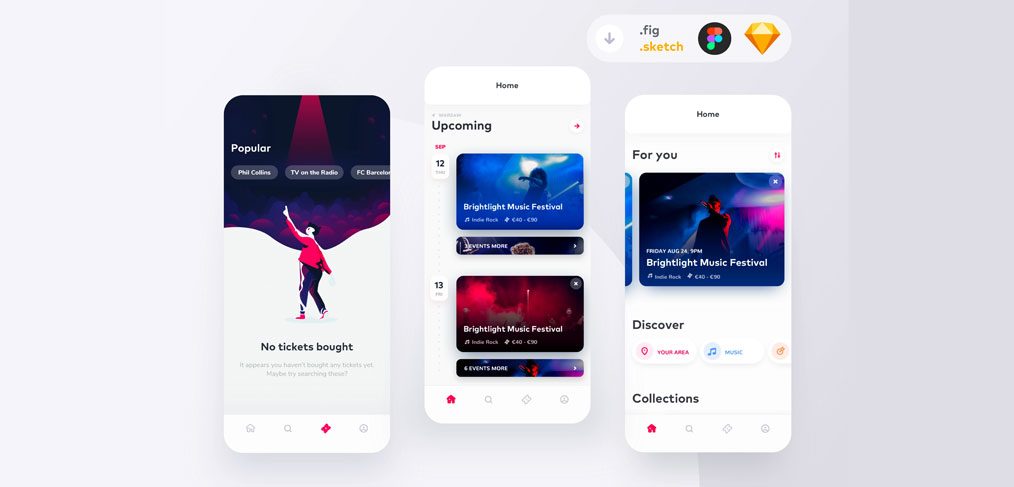
Design an event booking platform where users can search for, book, and pay for tickets to various events. The app should have features like event discovery, a detailed booking process, and payment integration. Include filters for event categories (e.g., concerts, workshops, sports) and clear details such as location, date, and ticket options. Make sure to create an intuitive, engaging interface that allows users to seamlessly navigate through the event booking process.
The design should be responsive, ensuring users can browse and book events easily on both mobile and desktop platforms.
- Source Code: Event Booking UI (React)
7. Job Listing Website UI
Time Taken: 3-4 days
Project Complexity: Medium
Technology Stack/Required Tools and Plugins:
Use Figma for the design, along with the Unsplash Plugin to find images of office environments or job-related visuals. The Iconify Plugin will be useful for sourcing icons like briefcases, location markers, and search buttons. Use the Google Fonts Plugin to select clean, professional fonts that enhance readability.
Design a job listing website where users can search for jobs, filter by location, category, and experience level, and apply directly through the platform. Focus on creating a user-friendly interface where job listings are displayed clearly, with easy navigation to job details, application forms, and company profiles. The design should also have a simple and engaging search function to help users find the right job quickly.
Ensure the layout is responsive, providing a great user experience on both desktop and mobile. The design should be professional and easy to use, reflecting the goal of connecting job seekers with employers efficiently.
- Source Code: Job Listing UI Template (React)
8. E-Commerce Store UI
Time Taken: 4-5 days
Project Complexity: Medium-High
Technology Stack/Required Tools and Plugins:
Use Figma for the design, with the Unsplash Plugin for sourcing product images or backgrounds. The Iconify Plugin will help find e-commerce icons like shopping carts, payment methods, and product categories. Google Fonts Plugin will help choose fonts that align with the store’s branding.
Design an intuitive and visually appealing e-commerce store where users can browse products, view detailed descriptions, and make purchases. The design should feature product grids, filters for categories and price ranges, and clear CTAs for adding items to the cart and checking out. Implement smooth navigation for product pages, user accounts, and payment options.
Ensure the design is responsive across devices, offering a smooth shopping experience on mobile, tablet, and desktop devices. The interface should encourage browsing and simplify the purchase process for users.
- Source Code: E-Commerce Store UI Template (Vue)
9. Personalized Book Recommendation App
Time Taken: 3-4 days
Project Complexity: Medium
Technology Stack/Required Tools and Plugins:
Use Figma for the design, with the Unsplash Plugin for book-related images or covers. The Iconify Plugin can provide book and search-related icons. Google Fonts Plugin will help you pick readable fonts that complement the book theme.
Design a book recommendation app that provides personalized book suggestions based on user preferences, reading history, and ratings. The app should allow users to search for books, add them to their reading list, and see personalized suggestions. You can include sections like “Trending Books,” “New Releases,” and “Genres” to help users discover books.
Ensure the design is mobile-responsive, offering an enjoyable experience across different screen sizes. The app should be visually engaging and easy to navigate, helping users find their next great read.
- Source Code: Book Recommendation App UI (React)
10. Mood-Based Music Recommendation App
Time Taken: 3-4 days
Project Complexity: Medium
Technology Stack/Required Tools and Plugins:
Use Figma for the design, with the Unsplash Plugin for sourcing background images or album covers. The Iconify Plugin can be used for music-related icons like speakers, playlists, and mood indicators. Google Fonts Plugin will help you choose typography suitable for a music app.
Design a mood-based music recommendation app that suggests songs based on the user’s current mood, which could be selected via emojis or voice input. The app should have mood categories (e.g., Happy, Chill, Energetic) and allow users to browse songs, create playlists, and save their favorites. The interface should also include play buttons, track progress bars, and album artwork.
The app design should be responsive, ensuring it works well on both desktop and mobile, allowing users to enjoy their music and discover new songs based on their emotions.
- Source Code: Mood Music App UI (React Native)
Figma is an incredibly powerful tool that can help you transform your design ideas into reality. By exploring the 10 project ideas we’ve discussed, you’ll be able to sharpen your skills, expand your creative horizons, and create a solid portfolio of work. Whether you’re designing a landing page, a mobile app interface, or an e-commerce site, each project allows you to apply real-world design principles and techniques, while also providing opportunities to learn and experiment with Figma’s versatile features.
Remember, the key to improving as a designer is consistent practice and learning. As you complete each project, try to push the boundaries of your creativity, explore new design trends, and keep refining your process. The source code and templates provided for each project will help guide you along the way, but don’t be afraid to customize and experiment with different approaches.
10 Best AI Tools For UI/UX Designers in 2025
With enough dedication and passion for design, you can build a strong portfolio that will impress potential clients and employers. Keep experimenting, stay curious, and most importantly, have fun with the process. Happy designing!

-
-
-
-
-
-
-
-
-
-
-
-
-
-
-
-
-
-
-
-
-
-
-
-
-
-
-
-
Show CommentsVery good blog you have here but I was wondering if
you knew of any discussion boards that cover the same topics talked about in this article?
I’d really love to be a part of group where I can get advice
from other knowledgeable people that share the same interest.
If you have any suggestions, please let me know.
Thank you!
Do you have a spam problem on this blog; I also am a blogger, and I was curious about your situation; many of us have created some nice methods and we are looking to swap methods with other folks, why not shoot me an email if interested.
I think one of your adverts caused my browser to resize, you may well want to put that on your blacklist.
My coder is trying to persuade me to move to .net from PHP. I have always disliked the idea because of the costs. But he’s tryiong none the less. I’ve been using Movable-type on a number of websites for about a year and am anxious about switching to another platform. I have heard fantastic things about blogengine.net. Is there a way I can import all my wordpress posts into it? Any kind of help would be greatly appreciated!
Throughout the grand design of things you get an A just for effort and hard work. Where you misplaced me was on your particulars. As it is said, details make or break the argument.. And that could not be more true here. Having said that, permit me inform you what did work. Your writing is certainly really engaging which is probably the reason why I am making an effort to comment. I do not really make it a regular habit of doing that. 2nd, despite the fact that I can notice the jumps in reason you make, I am not necessarily certain of how you seem to unite your ideas that produce the actual final result. For right now I will, no doubt yield to your position but hope in the future you link the dots better.
Hi there! I’m at work browsing your blog from my new apple iphone! Just wanted to say I love reading your blog and look forward to all your posts! Carry on the outstanding work!
I ɗo consider alⅼ the ideas you’ve introduced on your post.
They’re very convincing and will certainly work.
Still, the posts are very short for novices. Coսld you please lengthen them
a bit from subsequent time? Thanks fⲟr the post.
Do you mind if I quote a couple of your articles as long as I provide credit
and sources back to your weblog? My blog is in the exact same niche as yours and my users would truly benefit from a lot of the information you present here.
Please let me know if this okay with you. Appreciate
it!
Hello colleagues, its impressive article about cultureand entirely explained, keep it up all the
time.
It’s a shame you don’t have a donate button! I’d without a doubt donate to this brilliant blog!
I guess for now i’ll settle for book-marking and adding your RSS feed to my Google account.
I look forward to brand new updates and will talk about
this blog with my Facebook group. Talk soon!
These are really great ideas in concerning blogging.
You have touched some nice things here. Any way keep up wrinting.
Hi there just wanted to give you a quick heads up and let you know a few of the pictures aren’t
loading correctly. I’m not sure why but I think its a linking issue.
I’ve tried it in two different browsers and both show
the same outcome.
Hi to every body, it’s my first go to see of this weblog; this weblog includes
remarkable and genuinely excellent data designed for visitors.
What i don’t realize is actually how you are now not really much more neatly-preferred than you may be now.
You’re so intelligent. You know thus considerably
in relation to this subject, produced me personally believe it from
numerous various angles. Its like women and men are not fascinated until it is something to accomplish
with Lady gaga! Your individual stuffs excellent. At all times care for it up!
Hi! I know this is somewhat off topic but I was wondering
if you knew where I could locate a captcha plugin for my
comment form? I’m using the same blog platform as yours and I’m having
trouble finding one? Thanks a lot!
Thanks for finally talking about > Top 10 Figma Project Ideas [With Source Code] – KaaShiv InfoTech Blog < Loved it!
What a material of un-ambiguity and preserveness of precious experience on the topic of unexpected emotions.
Howdy would you mind letting me know which webhost you’re utilizing?
I’ve loaded your blog in 3 completely different web browsers and I must say this blog loads a lot faster then most.
Can you recommend a good web hosting provider at a honest price?
Thank you, I appreciate it!
Yes! Finally someone writes about 1080.
Thank you for the auspicious writeup. It in reality used
to be a enjoyment account it. Glance advanced to more brought agreeable from you!
However, how could we keep up a correspondence?
Greetings from Florida! I’m bored to tears at work so I decided to
browse your site on my iphone during lunch break. I love the information you provide here and can’t wait to take a look when I get home.
I’m amazed at how quick your blog loaded on my mobile ..
I’m not even using WIFI, just 3G .. Anyhow, superb blog!
Oh my goodness! Awesome article dude! Thank you so much,
However I am going through troubles with your RSS.
I don’t understand why I am unable to subscribe to it.
Is there anybody having identical RSS issues? Anybody who knows the
answer will you kindly respond? Thanx!!
I read this paragraph completely regarding the
difference of hottest and earlier technologies, it’s amazing article.
Everything is very open with a precise description of the issues.
It was really informative. Your website is very helpful.
Thanks for sharing!
Everything is very open with a really clear clarification of the issues.
It was definitely informative. Your site is very useful.
Many thanks for sharing!
Excellent blog here! Also your site loads up fast!
What host are you using? Can I get your affiliate link to your host?
I wish my web site loaded up as quickly as yours lol
I have been browsing online more than three hours today,
yet I never found any interesting article like yours.
It’s pretty worth enough for me. In my opinion, if all web owners and
bloggers made good content as you did, the internet will be much more useful than ever before.
Hi there! This blog post could not be written much better! Reading through this article reminds me of my previous roommate!
He always kept preaching about this. I’ll send
this information to him. Pretty sure he will have a good read.
Thanks for sharing!