

💻 Shell Scripting for Beginners – How to Write Bash Scripts in Linux (Explained Simply!)

Unix scripts Let’s talk about something that changed the way I work forever — I still remember the first time I automated a boring file backup task using a simple Bash script. It was like magic. I hit “Enter, and the system did all the heavy lifting.
Table Of Content
- 🧩 What Are Unix Scripts?
- ⚙️ Why Should You Learn Shell Scripting?
- 📝 How to Write Your First Bash Script in Linux
- 1. Create a New Script File
- 2. Add the Shebang Line
- 3. Add Some Commands
- 4. Save and Exit
- 5. Make It Executable
- 6. Run the Script
- 🔁 Variables in Unix Scripts
- 🔄 Conditional Statements in Shell Scripts
- 🧮 Loops in Bash Scripts
- 📚 Real-Life Use Cases of Unix Scripts
- 🧠 Tips for Writing Efficient Unix Scripts
- 🔐 Security Tips for Unix Scripts
- Final Thoughts
- Related Reads
If you’re wondering what Unix scripts are or how to write one, trust me — you’re not alone. I was equally confused when I first started. But once I got the hang of it, I realized scripting in Linux isn’t as scary as it looks. It’s logical, elegant, and surprisingly fun!
So, let’s break this down together — simply, practically, and with real examples.
🧩 What Are Unix Scripts?
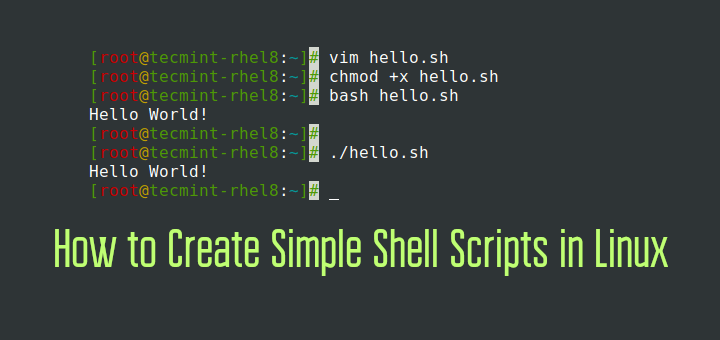
A Unix script, often written in Bash, is basically a list of commands that the computer runs one after another. Instead of typing each command manually, you can put them in a file — known as a script — and run it in one go.
Think of it like this: you’re teaching your computer to follow your routine automatically.
For example:
#!/bin/bash
echo "Hello, World!"
That’s it! That’s your first Unix script. Save this file as hello.sh, run chmod +x hello.sh, and execute it using ./hello.sh. You’ll see the magic — your script prints Hello, World! on the screen.
⚙️ Why Should You Learn Shell Scripting?
If you work with Linux, you must know shell scripting. It’s your secret weapon for automating repetitive tasks.
Here are a few things Unix scripts can help you do:
-
🗂️ Automate file backups
-
💻 Manage system tasks
-
📦 Install packages and updates automatically
-
🧠 Simplify data processing
-
⏰ Schedule jobs with cron
When I first learned shell scripting, I used it to automate my code deployment. Instead of manually copying files, my Unix script did everything in seconds. It saved hours of my time each week.
💡 Pro tip: If you’re learning Linux or DevOps, mastering Unix scripts will give you a serious edge.

📝 How to Write Your First Bash Script in Linux
Here’s a simple step-by-step way to create your first script.
1. Create a New Script File
Open your terminal and type:
nano myscript.sh
2. Add the Shebang Line
At the top of the file, write:
#!/bin/bash
This tells Linux that your file is a Bash script.
3. Add Some Commands
Add a few commands:
echo "Starting my script..."
date
pwd
4. Save and Exit
Press Ctrl + O → Enter → Ctrl + X.
5. Make It Executable
chmod +x myscript.sh
6. Run the Script
./myscript.sh
You just ran your first Unix script.
🔁 Variables in Unix Scripts

Variables let your script remember data.
Example:
#!/bin/bash
name="Manasir"
echo "Hello, $name! Welcome to Unix scripting."
You can also take input from users:
echo "Enter your name:"
read user
echo "Hi, $user! Glad to meet you."
It feels so interactive, right? That’s the beauty of Unix scripts — they can talk back to you!
🔄 Conditional Statements in Shell Scripts
Now let’s make our script think.
#!/bin/bash
echo "Enter a number:"
read num
if [ $num -gt 10 ]
then
  echo "That’s a big number!"
else
  echo "That’s a small number!"
fi
This is how Unix scripts make decisions. They respond based on conditions — just like us!

🧮 Loops in Bash Scripts
Loops help automate repetitive tasks.
for i in {1..5}
do
  echo "This is loop number $i"
done
When you run this, it prints the message five times. Imagine using this to rename 100 files or move hundreds of logs. Powerful, isn’t it?
📚 Real-Life Use Cases of Unix Scripts
Here are some real examples from my own Linux journey:
-
Automating backups: My nightly backup runs via a cron job that calls a Unix script.
-
Monitoring system logs: A simple Bash loop checks for errors and sends me an email alert.
-
Data cleanup: A scheduled Unix script deletes old files every Sunday.
When you start writing Unix scripts, you realize how much you can automate — from checking disk space to setting up entire servers.
🧠 Tips for Writing Efficient Unix Scripts
Here are a few lessons I learned (sometimes the hard way 😅):
-
✅ Always use comments to describe your code
-
✅ Test scripts in a safe environment before running them in production
-
✅ Use functions for reusable code
-
✅ Handle errors properly with
ifandexitcodes -
✅ Keep your scripts readable — future you will thank you!
If you’re curious to go deeper, check out the GNU Bash Manual — it’s a goldmine for learning advanced shell scripting.

🔐 Security Tips for Unix Scripts
Be careful when your script runs as root. I once accidentally deleted important logs because I didn’t validate user input. 😬
To stay safe:
-
Avoid using
rm -rfunless necessary. -
Always validate input from users.
-
Use absolute paths to avoid confusion.
-
Backup before automating destructive tasks.
Remember: a Unix script is powerful — but with great power comes great responsibility!
Final Thoughts:
When I look back, learning Unix scripts was one of the most useful skills I picked up as a developer. It gave me control — over my system, my workflow, and my time.
If you’re still on the fence, here’s my advice:
👉 Start small. Automate one tiny task.
👉 Run it, break it, fix it, and run it again.
That’s how you grow.
Once you write your first few Unix scripts, you’ll never go back to doing things manually again. Trust me — it’s addictive in the best way possible!
Want to Learn More ??, Kaashiv Infotech Offers Linux Course, Cyber Security Course, Networking Course and more, Visit Our website www.kaashivinfotech.com.
Related Reads:


